

Template Library
Every campaign template we offer, what each one says and does, and how to pick the right one.
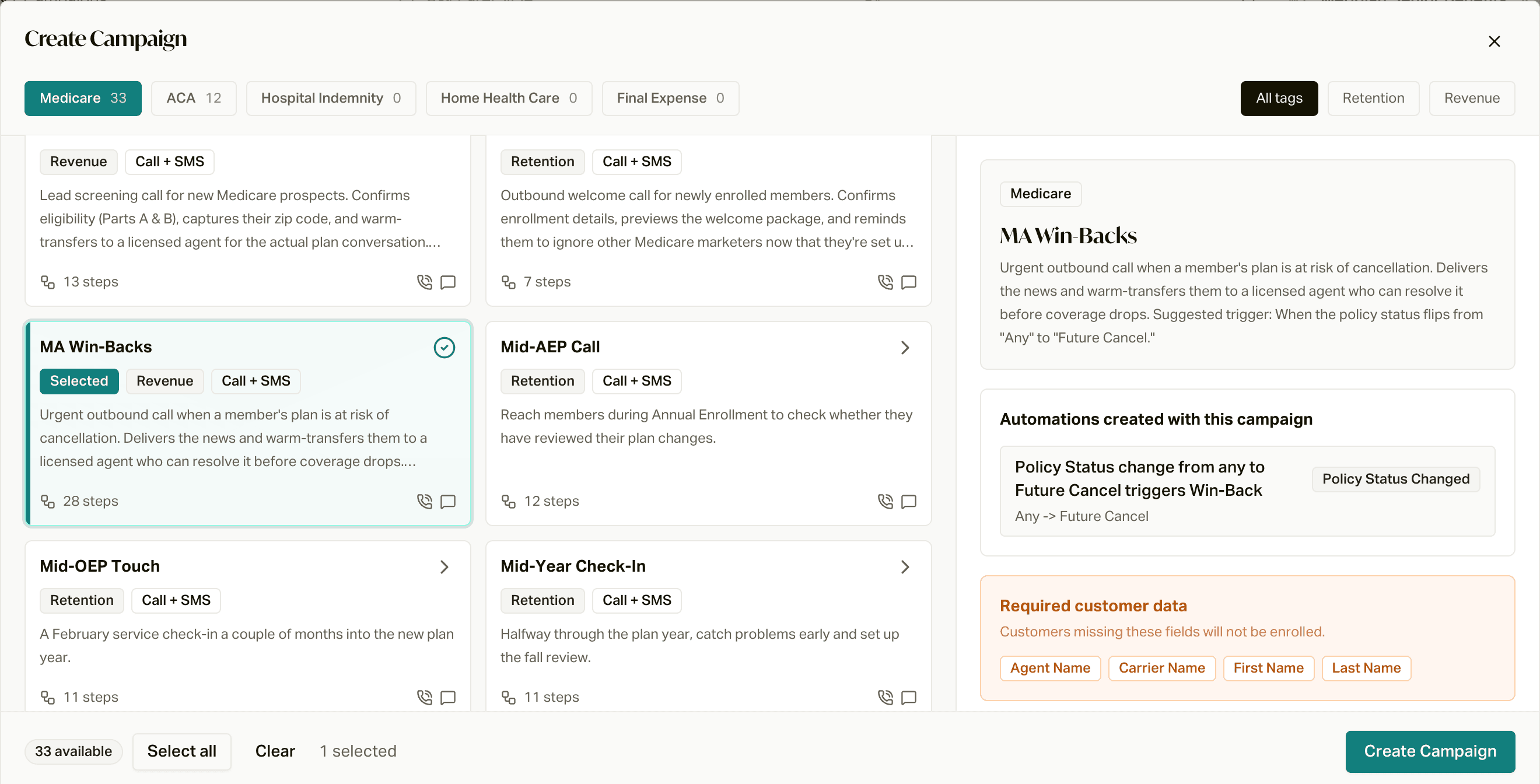
Templates are ready-to-go campaigns: a script, a cadence of calls and texts, and (for most of them) an automation that adds the right members on its own. They've done more volume than any one agency could on its own, and we keep them updated with what we learn. The best play is almost always to pick the template closest to what you want and tweak it from there.
Every template below has a brief: what the AI says, every text and voicemail word for word, when each one goes out, and who it picks up. Read the brief and you'll know exactly what your members are going to hear.
Create a Campaign from a Template
The step-by-step setup, start to finish.
The Retention Journey
How the templates line up across a member's first year and beyond.
AEP Renewals 2027
Our AEP campaign, powered by your Plan Crosswalk.
How to read the tables
- Type: Call templates use an AI employee (most also send texts). Text templates only send texts.
- Names: the links use the name you'll see in the template picker (a lot of them start with MA or ACA).
- How people get in: what the template's automation does out of the box. You add them means there's no automation; you pick who gets it. See Add Customers to a Campaign.
Medicare
New members
| Template | Type | How people get in |
|---|---|---|
| Welcome Text | Text | On their enrollment date |
| MA Welcome Calls | Call | 1 day after enrollment |
| MA Approval Calls | Call | You add them |
| MA ID Card Check-In | Call | 14 days after enrollment |
| ID Card Heads-Up Text | Text | 15 days after enrollment |
| MA Effective Date Check-In | Call | On their enrollment date |
| ID Card Not Received Text | Text | 14 days after effective date |
| MA 30-Day Check-In | Call | 30 days after effective date |
| 30-Day Check-In Text | Text | 30 days after effective date |
| MA 60-Day Check-In | Call | 60 days after effective date |
| 60-Day Check-In Text | Text | 60 days after effective date |
| MA 90-Day Check-In | Call | 90 days after effective date |
Staying in touch all year
| Template | Type | How people get in |
|---|---|---|
| Mid-OEP Touch | Call | February 15, every year |
| Spring Touch | Call | April 28, every year |
| Use Your Benefits Reminder Text | Text | June 15, every year |
| Mid-Year Check-In | Call | July 28, every year |
| Holiday & Pre-OEP Text | Text | December 22, every year |
| MA Birthday Text | Text | You add them (or add a Birthday automation) |
| 1-Year Anniversary Text | Text | 1 year after effective date |
| Silent Client Reconnect | Call | You add them |
AEP season
| Template | Type | How people get in |
|---|---|---|
| Pre-AEP Call | Call | September 8, every year |
| MA AEP Renewals Outreach | Call | You add them |
| Mid-AEP Call | Call | November 1, every year |
| AEP Renewals 2027 | Call | From your Plan Crosswalk |
Saves and alerts
| Template | Type | How people get in |
|---|---|---|
| Rapid Disenrollment Save | Call | Policy moves to Future Cancel, Terminated, or Cancelled in its first 30 days |
| MA Win-Backs | Call | Policy moves to Future Cancel, after its first 30 days |
| MA Payment Errors | Call | You add them |
| Formulary Change Alert | Call | You add them |
| Network Change Alert | Call | You add them |
Sales and utilities
| Template | Type | How people get in |
|---|---|---|
| MA Pre-Qualification | Call | You add them |
| MA Overflow Rescue | Call | You add them |
| Member Receptionist | Inbound | Answers your main line |
| Custom Campaign | Call | Blank starting point |
| Custom SMS Campaign | Text | Blank starting point |
ACA
| Template | Type | How people get in |
|---|---|---|
| ACA Welcome Calls | Call | You add them |
| ACA Approval Calls | Call | You add them |
| ACA ID Card Check-In | Call | You add them |
| 30-Day Check-In | Call | 30 days after effective date |
| 60-Day Check-In | Call | 60 days after effective date |
| ACA 90-Day Check-In | Call | You add them |
| ACA New Member Payment Reminders | Call | You add them |
| ACA Payment Errors | Call | You add them |
| ACA Birthday Text | Text | You add them (or add a Birthday automation) |
| ACA Overflow Rescue | Call | You add them |
| ACA Member Receptionist | Inbound | Answers your main line |
| Custom Campaign | Call | Blank starting point |
| Custom SMS Campaign | Text | Blank starting point |
Picking the right one
- "I want to welcome new members and keep them." Start with the Retention Journey. It's a ready-made set for a member's first year.
- "Members are cancelling." Win-Backs and Rapid Disenrollment Save. See Save Cancelling Members.
- "It's AEP." AEP Renewals 2027 if you've got a Plan Crosswalk, otherwise MA AEP Renewals Outreach.
- "I've got a specific list of people to call." Pick the closest template with no automation and add them yourself.
- "None of these fit." Start from the closest one and change the script in the Employees tab. Your careCycle representative can help too.
Templates for other lines of business (Hospital Indemnity, Home Health Care, Final Expense) show up in the template picker as they're published.