

The Wallboard
Live floor visibility for agents, outbound queues, inbound callback promises, productivity, and source performance.
The Wallboard is your contact-center floor view, built to run on a big screen or a supervisor's second monitor. It requires the Wallboard > View permission, and it has three tabs: Live, Productivity, and Sources. The queue and callback view lives on the Calls page (the View queues & callbacks button takes you there).
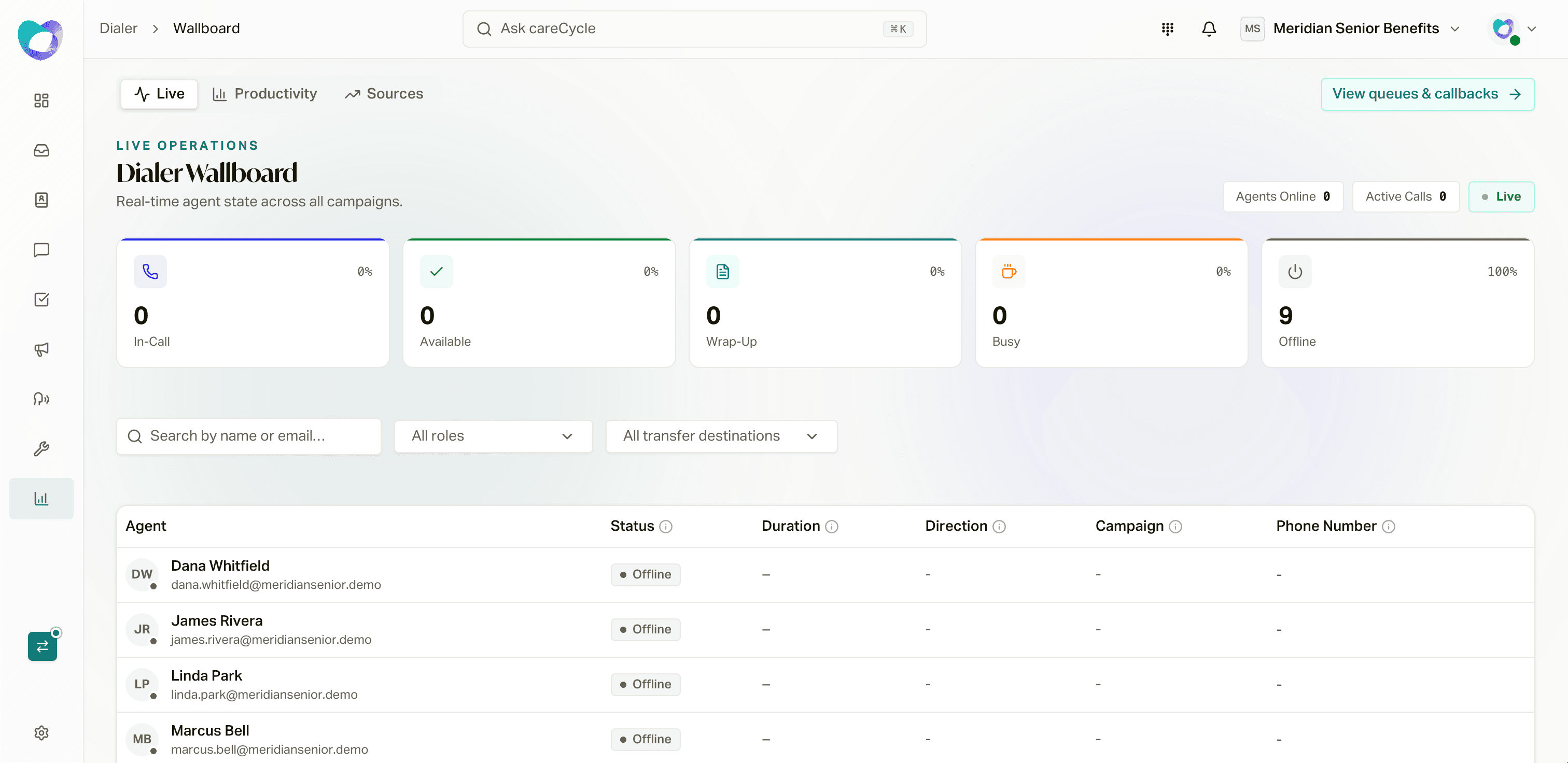
Live
The Live tab refreshes every few seconds. Five state cards across the top count agents who are In-Call, Available, Wrap-Up, Busy, and Offline (click a card to filter the table). Below, each agent row shows their status, a live timer in that status, and, while they are on a call, the campaign and the customer's number.
Busy rows also show the organization's configured reason, such as Lunch or Coaching. Timed reasons show when the agent returns to Available. Owners, administrators, and managers can set an online Available agent to a Busy reason, change an agent's Busy reason, or return a Busy agent to Available. Custom roles need the agent-status override permission. See Agent Availability and Auto-Answer for configuration and timer safety.
For agents on a call, the row menu offers Monitor actions: Listen in (silent), Whisper (only the agent hears you), and Barge (join the call). Use them for coaching and escalations. Listen in needs the Listen permission; Whisper and Barge both need the Barge permission. See Advanced Softphone Settings for Admins.
The Air Status Board
Below the live table, the air-status matrix crosses your agents against your campaigns. Each cell shows whether that agent is On air or Off air for that campaign, with per-campaign headers showing how many are on air and available right now.
From any cell you can take an agent off air with a preset (30 minutes, 2 hours, Rest of day, or Until I restore) and put them back early, and the Sources submenu blocks specific sources from ringing that agent, which is the fastest way to stop one vendor's traffic from reaching one person without touching the campaign.
Queues & Callbacks
Open Calls > Queues & Callbacks (or click View queues & callbacks on the wallboard). It's the live workload view for Agent Queue outreach. It combines customers waiting for outbound calls with inbound callers who accepted a callback offer. The summary refreshes every 15 seconds.
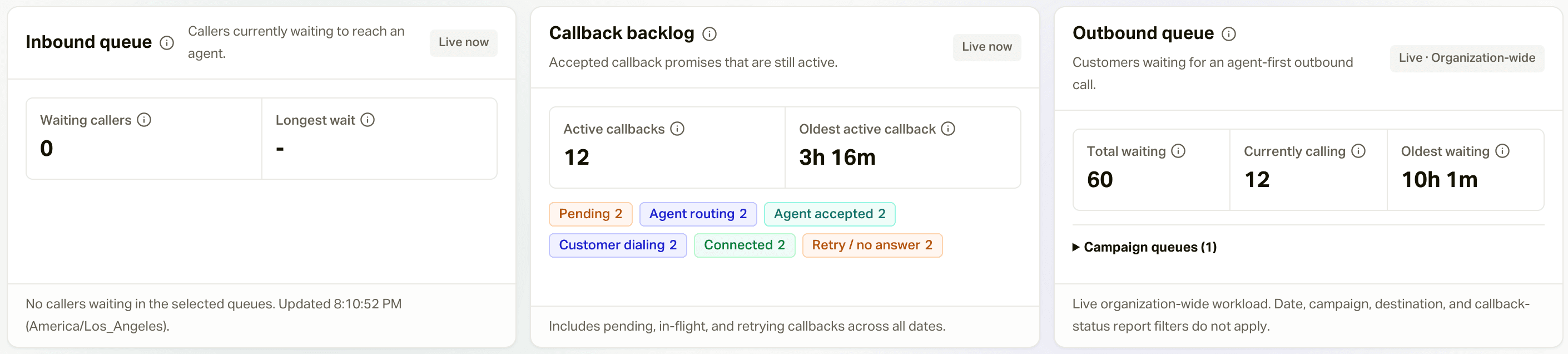
Outbound Agent Queue Queue
The outbound section shows:
- Total waiting: customers in
Awaiting callacross active or paused outbound Agent Queue campaigns. - Currently calling: customers whose campaign enrollment is Calling or In progress.
- Oldest waiting: how long the oldest customer has been waiting in the current queue.
- Campaign queues: waiting and calling counts for each active campaign, plus paused campaigns that still have work in flight.
Select View customers on a campaign row to open the Customers list filtered
to that campaign and Awaiting call status. Normal customer permissions and
contact-information redaction still apply in that drill-down. The wallboard
summary itself contains no customer names, phone numbers, or other PHI.
Awaiting call is persisted campaign state, not a promise that the customer
will be dialed immediately. Agent availability, state licensing, source
restrictions, campaign and shared-pool capacity, business hours, and caller-ID
capacity are all rechecked before a call begins.
Inbound Callback Promises
When an eligible inbound caller accepts the callback offer on an Agent Queue destination, the callback appears in the lower half of this tab. The live status totals distinguish:
- Pending and agent routing
- Agent accepted
- Customer dialing and connected
- Retry / no answer
- Completed, expired, unreachable, and cancelled
The top metrics show callback queue depth, oldest pending age, offer acceptance, completion before expiry, median and p95 wait, and broken promises. Use the campaign, routing-pool, destination, status, and date filters to investigate a specific flow. The hourly chart uses your organization's timezone.
The episode table joins the original inbound call to its callback attempts and shows request time, expiry, attempts, last failure, campaign, destination, and accepting agent. It intentionally excludes customer contact details.
An accepted callback is At risk when 15 minutes or less remain before its expiry. Overdue means its expiry has passed while it remains active. Work overdue promises first, then at-risk promises with no agent or repeated failures.
If a callback reaches the customer but the agent closes careCycle before submitting a disposition, the promise remains connected and waiting for agent wrap-up. The agent is prompted to disposition that call again on the next login, and the callback completes only after the disposition is saved.
Callback expiry is the earlier of the configured promise window or business close minus the destination's closing buffer. The hourly self-healing sweep expires overdue requests on its first run after that timestamp; it does not add another grace hour.
Productivity
The Productivity tab is the retrospective: pick a date range (up to 90 days back) and filter by agents, campaigns, and dispositions. Summary cards show Agents, Total Calls, Logged-in Time, and Avg Efficiency; the per-agent table breaks down logged-in, active, available, busy, and wrap-up time, including Busy time by configured reason, call counts, and average call length, with extra columns when you filter to specific dispositions. Export downloads it all as CSV.
A second table, Dispositions by Campaign & Agent, shows the outcome mix per person per campaign, which is where coaching conversations usually start.
Sources
The Sources tab is the same source performance reporting documented in Source Tracking, placed here so floor managers can watch vendor quality alongside the live board.