

Test Your Campaign
Talk to your own AI employee in the browser or on your phone before a single member hears it.
Every campaign's Overview tab has a Test this Campaign card, so you can have the exact conversation your members will have before you go live. Test calls use your Test Customer record for member data, and finished tests show up on the Calls page like any other call, transcript and all.
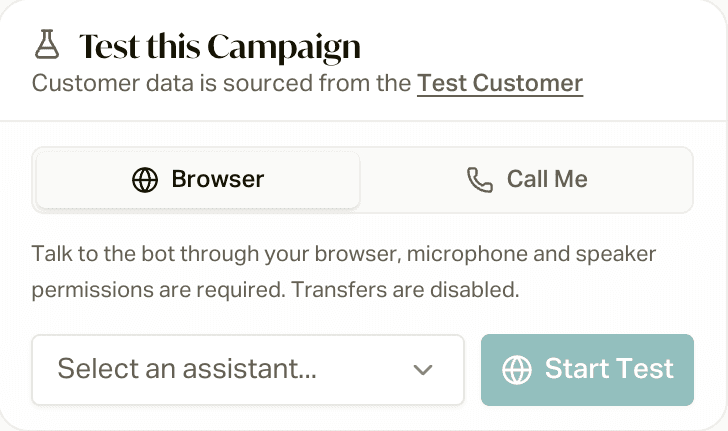
Two Ways to Test
Talk to the AI right in your browser. You'll need to allow your mic and speakers. You get a live transcript as you talk. Transfers are disabled in browser tests, so use this one for the script, the tone, and how it handles questions.
Press Start Test, talk, and press End when you're done.
The AI calls the phone number on your user profile over a real phone line, so you get the full call flow, transfers included. If your profile doesn't have a phone number, add one first.
Press Call Me and your phone rings in a few seconds.
If the campaign has more than one AI employee (say, a daytime one and an after-hours one), pick which one to test from the Select an assistant... dropdown first.
The Preflight Check
If the script needs member data your Test Customer doesn't have, the phone test stops before dialing with Missing required variables and a list of what's missing. Real members hit the same check when they're added to the campaign, and they get skipped if they're missing it. So a failing preflight usually points at a gap in your customer data, not just your test record.
To fix it, fill in the field on your customers (by re-importing, through your CRM sync, or by hand). See the Book of Business Field Reference and Custom Fields. If members aren't getting called, Why Wasn't My Customer Called? walks through every check.
Try It in the Simulator Too
The Assembly tab has an AI employee simulator: a text chat with your AI where you play the member. It never actually transfers anyone, and you can coach it line by line (leave a Coaching note and click Save coaching). It's also how you test script changes before they go live. See Edit Your AI with Assembly.
Test a text-only campaign
Text-only campaigns (like the birthday or welcome texts) don't have an AI employee, so there's no Test this Campaign card. Instead, run the real thing on just yourself:
Make a customer record for yourself
Add a customer with your own cell number (and a state or time zone), or use one you already have. Fill in anything the texts use, like first name and carrier.
Keep everyone else out
First, check the Overview tab: the campaign should have nobody in it. Anyone already added to a Draft campaign starts the moment you activate, so if real members are waiting in this one, don't test here. Create a second campaign from the same template just for testing instead.
Then, if the campaign has an automation, open its Configuration > Enrollment Automations editor, click the automation, turn off Active, and click Save Changes, so nobody else gets added while you test.
Add yourself and activate
On the Customers page, find your record, click Add to campaign, and pick the campaign. Then click Activate on the Overview tab.
Check your phone
The first text goes out within a few minutes, as long as it's inside your business hours (and 8 AM to 9 PM in your time zone). Later texts follow the campaign's timing, so a "Day 3" text really does wait until day 3.
Put it back
When you're happy, turn the automation back on (or add your members) so the campaign starts working for real.
Texts only send once your SMS registration is done. Want to test again later? You're "previously enrolled" now, so use Restart on your record.
What to Listen For
- Does it sound like your agency? If not, change the wording yourself in the Assembly tab. Just tell it what you want different.
- Do escalations do the right thing? Trigger a transfer on a Call Me test and make sure it rings the right people.
- Are the member details right? The AI should greet your Test Customer by name and get their info right.