

Nodes and Configuration
The node types that make up a Pulse workflow, call node options, and how to send SMS (custom messages, templates, pre-call SMS).
Pulse nodes
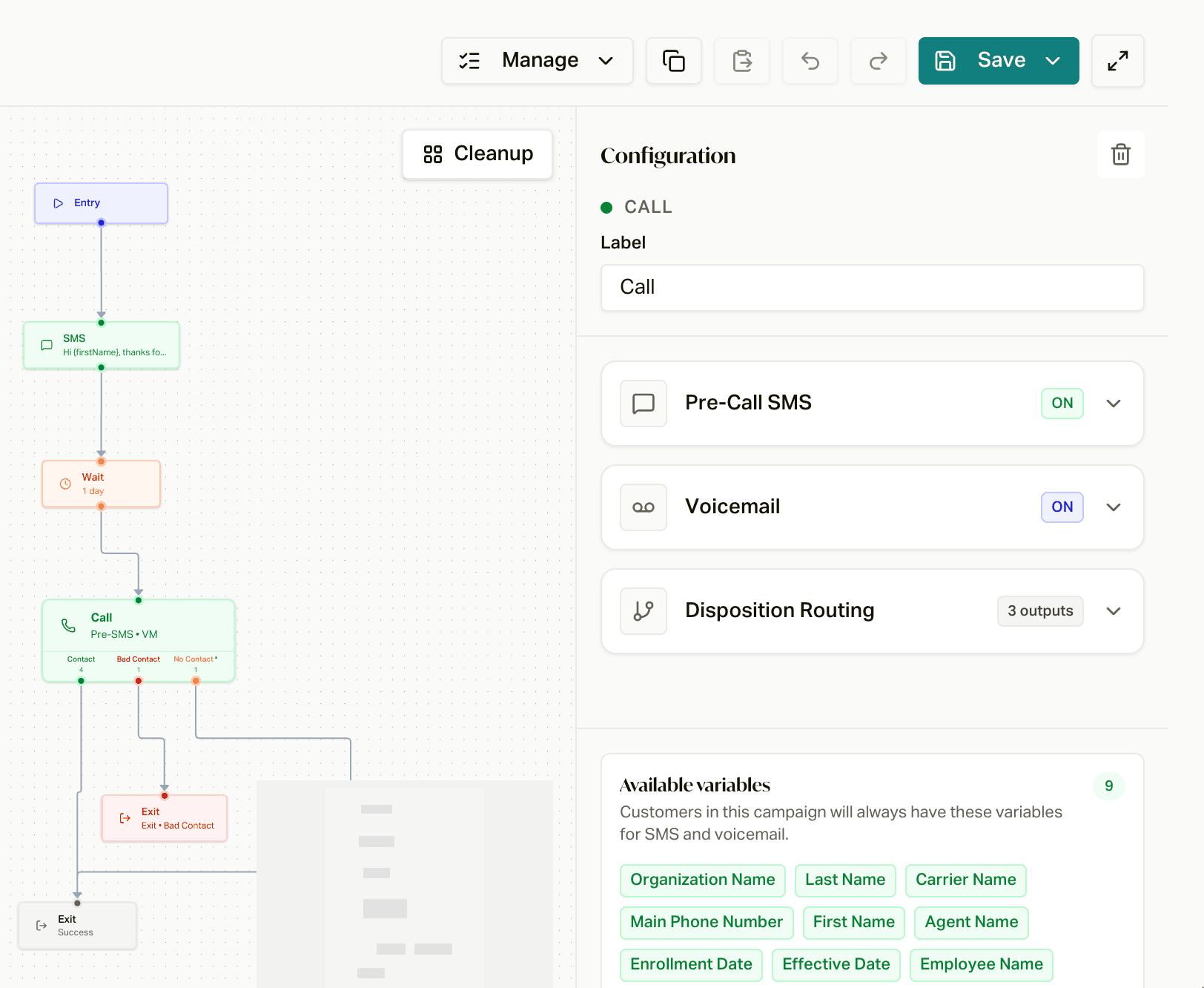
A Pulse is built from these node types:
Entry node
Marks the start of an enrolled customer's sequence. Configure who enters and when through enrollment actions and Enrollment Automations, separately from the Pulse graph.
Call node
Schedules an outbound call in the campaign workflow. An Agent Queue's primary Inbound or Outbound direction is fixed at creation. Voice AI calls use the AI employee. Normal Agent Queue Call nodes use human agents, including deliberately configured follow-up from an inbound queue.
Normal Agent Queue Pulse calls are dial-first: careCycle dials the customer and runs mandatory answering-machine detection (AMD). A live-person result proceeds to agents; an uncertain or failed classifier can also proceed to agents. An explicitly requested callback is the accept-first exception: the agent accepts before the customer is dialed. Receiving an incoming call does not automatically enroll its caller in Pulse.
Each call node supports:
- Pre-call SMS: a text sent shortly before the call to let members know you're calling and why. See Sending SMS below.
- Voicemail handling: choose what happens when voicemail is detected. See Voicemail modes below.
- Customer variables: personalize SMS messages and voicemails to maximize contact rates and callbacks.
Call outcomes are configured as outputs on the Call node. They choose the next step, such as retrying a missed call. See Dispositions and Routing.
SMS node
Sends a custom message or a reusable template at any point in the cadence. See Sending SMS below.
Data routing node
Evaluates current customer, primary-policy, supported custom-field data, or customer tags. Conditions within a branch must match; the first matching branch wins, otherwise the configured default wins. Data routing does not choose a human agent. See Routing on customer data and tags.
Wait node
Uses an elapsed duration, or waits until a clock time in the customer's timezone (UTC when unavailable), before the next action. Outgoing delivery hours are a separate check; a two-day duration does not mean two business days. A wait directly followed by an Exit can complete without scheduling a delayed action.
Exit node
Ends the journey with its configured completion/failure result, subject to runtime handled-outcome overrides. A completed cadence does not prove a sale or another business objective.
Sending SMS
Pulse can send SMS at any point in a cadence. Texts are sent from your agency's main phone number, so replies and callbacks land on one consistent number members recognize.
There are two ways SMS goes out:
- SMS node: a standalone step in the workflow. Use it to follow up after a missed call, confirm an appointment, or nurture between call attempts.
- Pre-call SMS (on a call node): a text sent shortly before the call is placed, letting the member know you're about to call and why. On modern smartphones the device populates your business name from the message, priming recognition and improving contact rates.
Custom messages vs. templates
For any SMS you can either write a custom message inline on the node, or reuse an SMS template so the same wording is shared across campaigns and stays consistent. Templates are the better choice when the same message is used in more than one place, so an edit updates everywhere at once.
Personalization with customer variables
Both custom messages and templates support customer variables, which are merged in per recipient (for example, the member's first name, plan, or appointment time). Personalization lifts contact and callback rates, so use variables wherever the message would otherwise read as generic.
Voicemail modes
Every call node has one of three voicemail modes:
| Mode | What happens when voicemail is detected |
|---|---|
| Inherit campaign message | Uses the campaign's default outbound voicemail message. If the campaign has no default, careCycle hangs up silently. |
| Override for this attempt | Uses a message configured on this call node instead of the campaign default. |
| Hang up silently | Leaves no message and ends the call. |
These modes control whether careCycle leaves a message. They do not disable AMD on normal Agent Queue Pulse calls. Older nonempty node messages retain their per-attempt override. Older Voice AI nodes without an explicit mode or campaign default can retain employee voicemail behavior.
Compliance
SMS follows the same opt-out and quiet-hours rules as the rest of the platform. A member who replies STOP is suppressed from further messages automatically, and texts are not sent outside compliant hours. See Error Handling and Retries for how hours are enforced.
Export and Import
A proven cadence should not have to be rebuilt by hand. From the workflow menu in the Pulse builder:
- Export downloads the workflow as a file.
- Import loads an exported workflow into another campaign and walks you through a review before anything changes: it shows how the incoming pulse maps onto this campaign, and for each disposition the workflow routes on you choose to keep it, drop it, or remap it to one of this campaign's dispositions (Agent Queue campaigns remap onto outcome types). SMS template references get the same treatment.
Importing updates the editable canvas after review. Saving that draft and publishing it are distinct. Review publication's impact on existing version-pinned journeys rather than assuming every customer moves to the new graph.
Export and import are also how you edit a Pulse with Claude or ChatGPT. See Edit Your Pulse with an LLM.