

How careCycle Fits Together
One page that explains the whole system, told through the life of a single member.
careCycle has a lot of features, but they all serve one shape: the life of a member. If you understand that shape, every screen in the platform makes sense. This page walks through it once, start to finish.
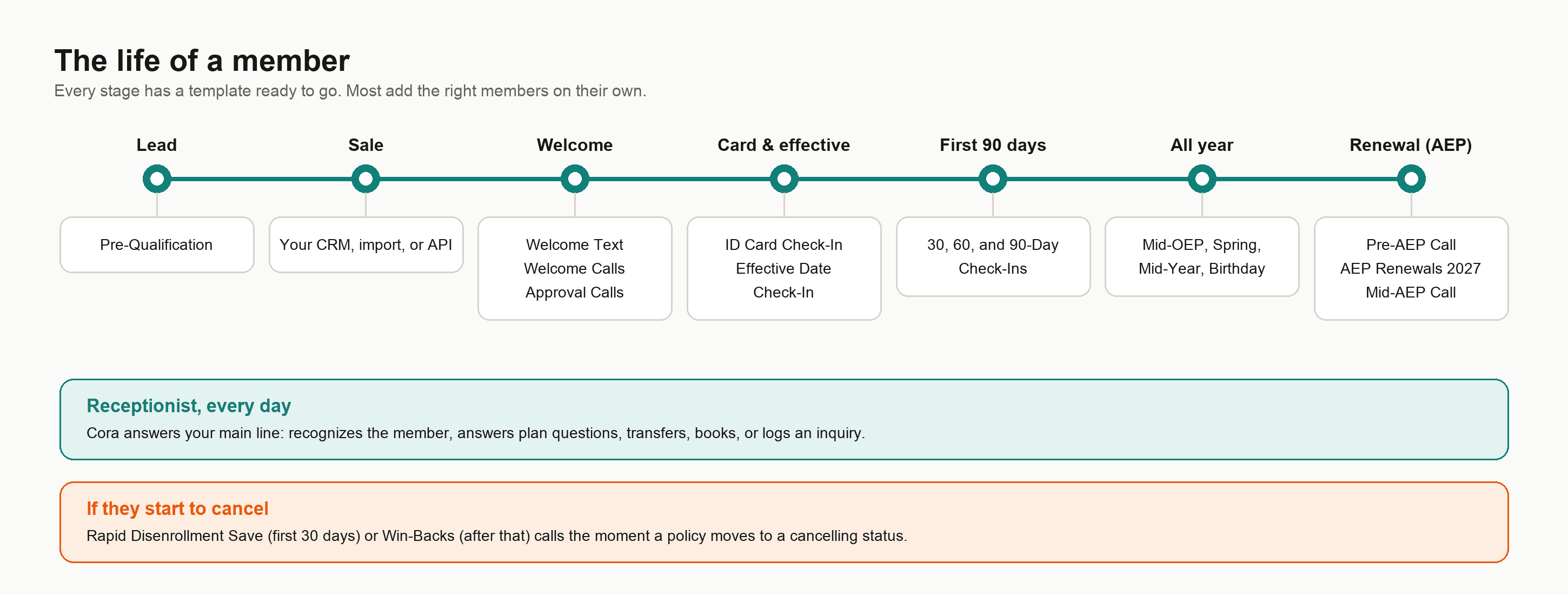
The Life of a Member
Meet Margaret. Today she's a lead. A year from now, she should be a member who renews without shopping around. Here's what careCycle does at every step in between. Each step below is a ready-made template in the Template Library, so you're not building any of this from scratch.
A lead comes in. Margaret fills out the form on your website asking for a Medicare review. Once she's added to it, the Pre-Qualification campaign calls her back, asks a few quick eligibility questions, and warm transfers her to a licensed agent. (Prefer your own agents on the phone? Run it as an Agent Queue campaign instead.)
The sale happens. Your agent enrolls Margaret. Her customer record and new policy land in careCycle, from your CRM sync, a CSV import, or the API.
The welcome goes out on its own. On her enrollment date she gets the Welcome Text. A day later, Welcome Calls picks her up: a quick thank-you text, then a call to welcome her, confirm her carrier and start date, and get your number saved in her phone. Nobody had to remember to do this. Each template comes with an automation, a rule that adds the right members on its own, and these ones are based on her enrollment date. That's the single most important idea in careCycle: the journey runs itself.
Her application is approved. The Approval Calls campaign gives her the good news and explains what's next. This one doesn't add people on its own, so you add members (or set up your own automation) when applications get approved.
Her card should be in the mail. Two weeks after she enrolls, the ID Card Check-In asks if her card showed up, and points her to the carrier's portal if it didn't.
Her plan goes effective. The Effective Date Check-In calls to let her know she's all set, mentions a couple of her plan's benefits, and checks whether she has a regular doctor. The 30, 60, and 90-day check-ins follow. If she has questions the AI can't answer, it transfers her to your team, books an appointment with her agent, or raises an Inquiry for your team to follow up on.
She calls you in July. Margaret calls your main number about a prescription price. Cora, your Receptionist, answers, recognizes her, checks her plan data, and answers on the spot. If it were a complaint, Cora would have transferred her live to your team's softphone, with the right script already on the agent's screen.
Renewal season arrives. On September 8 the Pre-AEP Call gives her a heads-up that her agent's keeping an eye on next year's changes. MA AEP Renewals Outreach gets her on the phone with her agent (or on their calendar), AEP Renewals 2027 walks her through what's changing with her plan, and the Mid-AEP Call on November 1 makes sure she's looked. Margaret stays, and her lifetime value grows.
If she ever starts to cancel. The moment her policy moves to Future Cancel, Terminated, or Cancelled, Rapid Disenrollment Save (in her first 30 days) or Win-Backs (after that) is on the phone trying to get her to your team. See Save Cancelling Members.
At every step, your team sees the same record: her calls, transcripts, policies, inquiries, appointments, and texts, all in one place. For the whole first year laid out step by step, see The Retention Journey.
The Six Concepts Behind the Story
Six features power everything above. Each has its own guide, but here is how they work together:
Every conversation belongs to a campaign. Each call and text Margaret received came from a campaign, and every campaign is defined by a few basic settings: who talks (AI or your agents), which direction (inbound or outbound), and what job it does (tagged Retention, Revenue, or Receptionist). Most campaigns start from a template. See Campaigns Explained.
Pulse sets the cadence. Each campaign has a Pulse workflow that decides when to call, when to text, how long to wait, and when to stop trying. See Pulse.
Dispositions record how each call ended. Every call gets an outcome, such as No Answer, Transferred, Appointment Scheduled, or Do Not Call, and you can define your own for the outcomes your business cares about. Pulse uses these outcomes to decide what happens next. The AI sets them automatically; your agents set them at wrap-up. See Dispositions and Routing.
Automations decide who gets in. They add customers to campaigns when something happens (a policy is created or changes status) or when a date comes up (days after their enrollment or effective date, a birthday, a fixed day each year). They can also take people out. Templates come with their automations already set up, and because everyone's dates move along the same timeline, the campaigns line up into a journey on their own. See Automations Explained.
The Campaign Toolkit is shared. Routing groups, calendar settings, and scripts are building blocks configured once and reused by every campaign and by Cora. Change one and it changes everywhere it is used. See the Campaign Toolkit.
Compliance is enforced on every channel. TCPA calling hours, your business hours and holidays, do-not-call and STOP suppression, and SMS registration are enforced by the platform automatically, so a campaign cannot text before it is registered or call outside legal hours. See TCPA Compliance and SMS and RCS Registration.
The Two Halves of the Platform
Everything in careCycle is either the AI doing work or your people doing work, sharing one record.
- The AI half: Cora on the Receptionist page, Voice AI campaigns, Pulse, and the Assembly tab, where you change what the AI says. Set its escalations in Configuration > Scenarios & escalations.
- The human half: the Inbox for texts and follow-ups, the softphone and dialer for calls, Tasks and Appointments for the to-do list, and the Dashboard and Wallboard for keeping score.
The handoff points between the halves (transfers, inquiries, appointments) are exactly the things you configure in Escalations and the Campaign Toolkit.
Where to Go Next
Here is the natural reading order from this page:
Template Library
See every ready-made campaign, with a brief that shows exactly what each one says and does.
The Retention Journey
How the templates line up across a member's first year and beyond.
How Campaigns Run
What happens after you click Activate, and what takes someone out.
Campaigns Explained
Go one level deeper: the settings that define every campaign, and the campaign lifecycle.
Set Up Your Agency
The step-by-step checklist that builds everything this page described.
Configure Your Receptionist
Put Cora to work on your central number.
Campaign Toolkit
Master the shared building blocks: transfers, appointments, Pulse, and Assembly.