

Automations Explained
Shared rules that enroll customers, remove them from campaigns, or create follow-up tasks.
Automations watch your data and act when a customer matches. Campaign and task automations share one set of triggers and filters, so the same event or date can drive outreach and follow-up work. Their actions remain separate.
Manage campaign automations on a campaign's Configuration > Enrollment Automations editor. Manage task automations from the Automations button on the Tasks page.
The Two Actions
Campaign automations do one of two things when they fire:
- Enroll into a campaign: add the matching customer to a target campaign.
- Remove from campaign(s): take the customer out of outreach, with a final status of Completed or Failed, scoped to any active campaign or specific campaigns. This is your safety valve: one exit automation can stop everything for a customer the moment a condition is met.
Task automations create one or more task templates. Each template controls the task title, description, tags, priority, and due offset. The task is assigned to the member assigned to the customer. If the customer has no assigned member, task creation is skipped.
Behind the scenes careCycle files enrollment automations into two categories: entry (triggered by data, like a new policy) and intra (triggered by another campaign completing or failing). You never pick the category; it follows from the trigger you choose, and intra automations are what chain campaigns together.
The Triggers
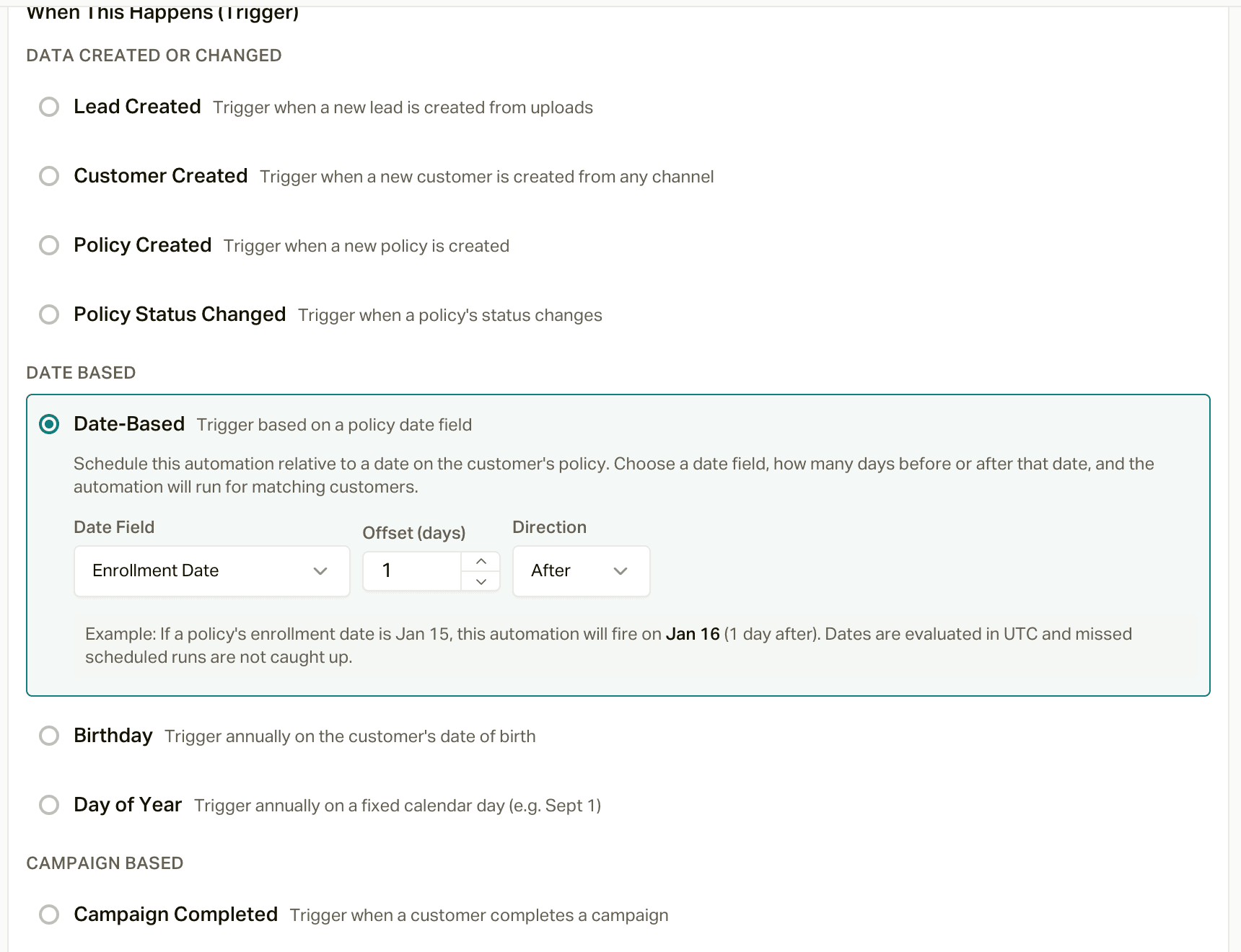
Triggers come in four families, exactly as the builder groups them:
Data created or changed: Lead Created, Customer Created, Policy Created, and Policy Status Changed (with one or more From and To statuses; an empty side means any status). These fire within seconds of the change, which is what makes speed-to-lead and save calls automatic. A couple of things worth knowing:
- Lead Created and Customer Created fire for leads that come in through your lead sources (the leads API). They don't fire for customers you import or create in the app.
- Policy Status Changed fires when an existing policy's status changes, whether that's from an import, a CRM sync, the API, or someone editing it in the app. A brand-new policy that arrives already in a status only fires Policy Created.
Date based: Date-Based (a policy date like Effective Date or Renewal Date, offset by up to 365 days before or after), Birthday (annually on the customer's date of birth, with an optional "At age" so you can target exactly the 65th), and Day of Year (a fixed calendar day, like September 1).
Campaign based: Campaign Completed and Campaign Failed (watch a source campaign and act on its outcome) and Time In Campaign (after a customer has been in a campaign N days, most useful for exits).
Task based: Task Completed (when a task with a chosen tag is marked Done or Cancelled, with an optional linked-policy status restriction).
The same trigger choices are available for campaign and task automations.
customer_field_changed remains supported for existing automations but is not
currently shown in the builder. The retired policy_changed value is rejected
for new campaign automations.
The Filters
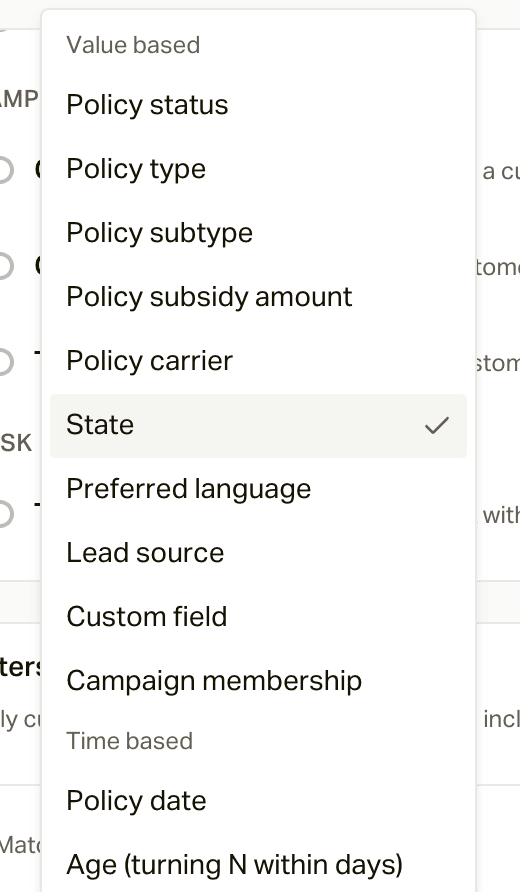
Campaign and task automations use the same filters. Leave them empty and the automation applies to everyone the trigger matches; add conditions and choose whether they Match ALL or Match ANY. You can filter on policy status, type, subtype, subsidy amount, carrier, and dates; customer state, language, and age; lead source; custom fields; and campaign membership.
For a policy-scoped trigger, policy filters inspect only the policy that caused the event. This includes Policy Created, Policy Status Changed, Date-Based, and a Task Completed event linked to a policy. Other triggers evaluate policy filters against all of the customer's policies and match when any policy qualifies.
How Often an Automation Fires
Automations are built to never double up on someone:
- Date-based triggers (Date-Based, Birthday, Day of Year) check once a night and only pick up people whose date is today. They don't go back and catch dates that already passed. Birthday and Day of Year check again every year, but only add people who haven't been through the campaign yet (see the next point).
- Policy Created and Policy Status Changed fire once per policy, per automation, ever. If the same policy makes the same change twice, the second time doesn't count.
- Once someone finishes a campaign, its automations won't add them again. Use Restart if you want them to go through it a second time.
- Time In Campaign is the one that catches up: anyone already past the number of days gets picked up on the next nightly run.
Watch out for Draft campaigns
An automation can add people to a campaign that's still a Draft. If their first call or text comes due before you activate, it's dropped and they're marked Skipped, for good. Templates create their automations switched on, so finish setup and activate quickly, or disable the automation until you're ready.
Why This Is the Journey
Put the pieces together and the lifecycle runs itself: a member enrolls and a date-based automation sends the welcome text the next day and the welcome call the day after that; another sends the effective date check-in; 30, 60, and 90 days later the check-ins go out; and every year the calendar touches and birthday text keep you in front of them. A policy moves to Future Cancel, and a status automation gets a save call going within minutes. An exit automation retires anyone who should no longer be contacted. Nobody has to remember to do any of it, which is the point.
Our templates come with these automations built in. See The Retention Journey for how they line up.