

Which Number Your Calls Come From
Why your team's calls always come from your main number, how campaigns choose a number, and how to give a campaign its own numbers to protect your main line.
"What number does this call from?" comes up a lot, so here's the whole picture in one place. The short version: calls your team makes by hand always come from your agency's main number, and each campaign can either use your main number or its own set of numbers.
Your main number
Every agency has one main number. It's the number your Receptionist answers, the one you picked when you signed up (or ported in). It's your agency's front door: members save it, call it back, and text it.
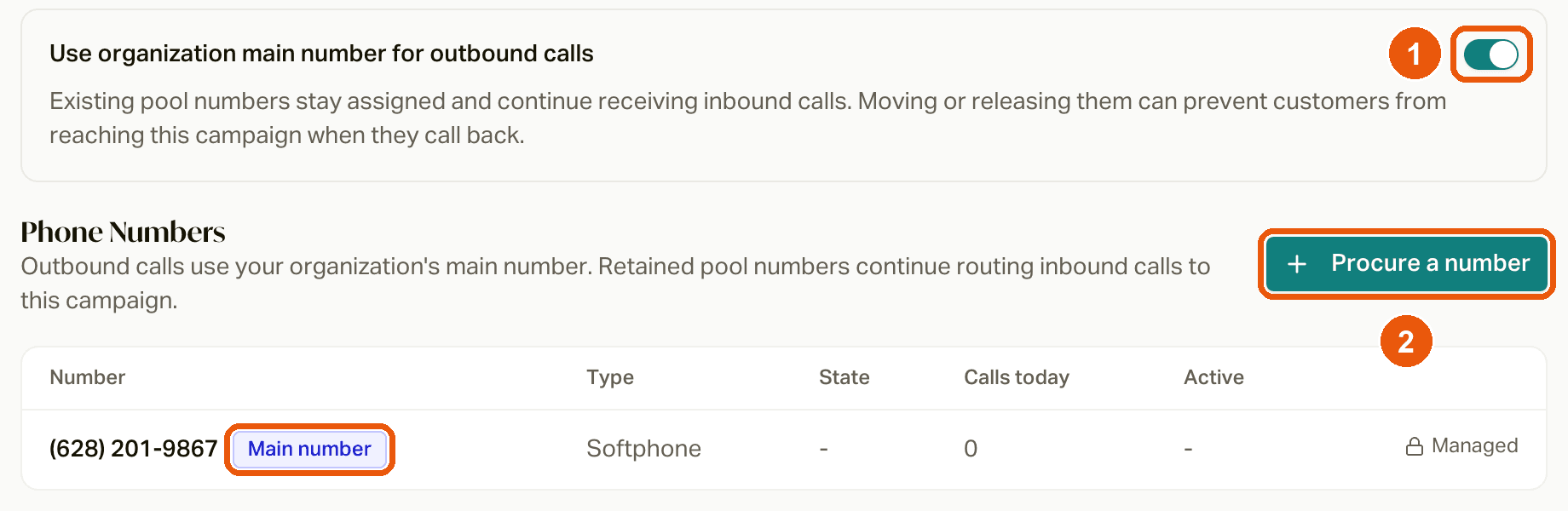
You'll see it on any campaign's Phone Numbers tab with a Main number badge and a Managed lock. It can't be moved or changed from the app. If you ever need a different main number, reach out to us.
Calls your team makes by hand
When anyone on your team places a call themselves (from the dial pad, the call button on a customer, the phone button in the Inbox, or an inquiry callback), it always comes from your main number. There's no per-person number, and there's no way to pick a different number for manual calls.
That's on purpose:
- Members recognize you. Every call from your agency shows the same number, so they learn it and pick up. A different number for every agent looks like a bunch of strangers.
- Callbacks land in the right place. When a member calls your main number back, careCycle knows who they are and routes them: back to the campaign that called them, to the inquiry or appointment they're waiting on, or to your Receptionist. A personal number per agent would break all of that.
- No juggling. When an agent leaves or a new one starts, nothing changes for your members.
One exception: if you add someone else to a call (like a carrier or a provider), they see the member's number, so they know who they're helping.
Calls your campaigns make
Each campaign has its own caller ID setting, found on its Phone Numbers tab: Use organization main number for outbound calls.
- On: the campaign calls from your main number.
- Off: the campaign calls from its own numbers (its "pool"), which you add on that same tab.
Which one you start with depends on the kind of campaign:
| Campaign | Starts with |
|---|---|
| Campaigns created from a template (Voice AI) | Your main number |
| Agent-first campaigns | Their own number (one is bought for you when you create it) |
| Your Receptionist | Always your main number |
It works the same way for Voice AI and agent-first campaigns.
Should a campaign use its own numbers?
Using your main number is great for campaigns where members know you: welcome calls, check-ins, renewal reminders. They see your number, they answer, and when they call back, they reach you.
Give a campaign its own numbers when:
- It makes a lot of calls. Carriers watch how many calls a number makes. If a high-volume campaign pushes your main number too hard, it can get flagged as spam, and then every call from your agency (including your team's manual calls) is more likely to show up as "Spam Likely". Moving the volume to separate numbers keeps your main line clean.
- It calls people who don't know you yet, like leads or prospects.
- You want local presence, with numbers from the areas you're calling.
A couple of trade-offs to know about:
- Callbacks go to the campaign. When someone calls a campaign number back, they reach that campaign (as long as it's active or paused), not your Receptionist.
- Texts still come from your main line. Campaign numbers are for calls only. Texts always go out from your registered texting number, and texts sent to a campaign number aren't received.
Give a campaign its own numbers
Easiest before you activate the campaign:
Open the campaign's Phone Numbers tab
It's on every campaign except your Receptionist.
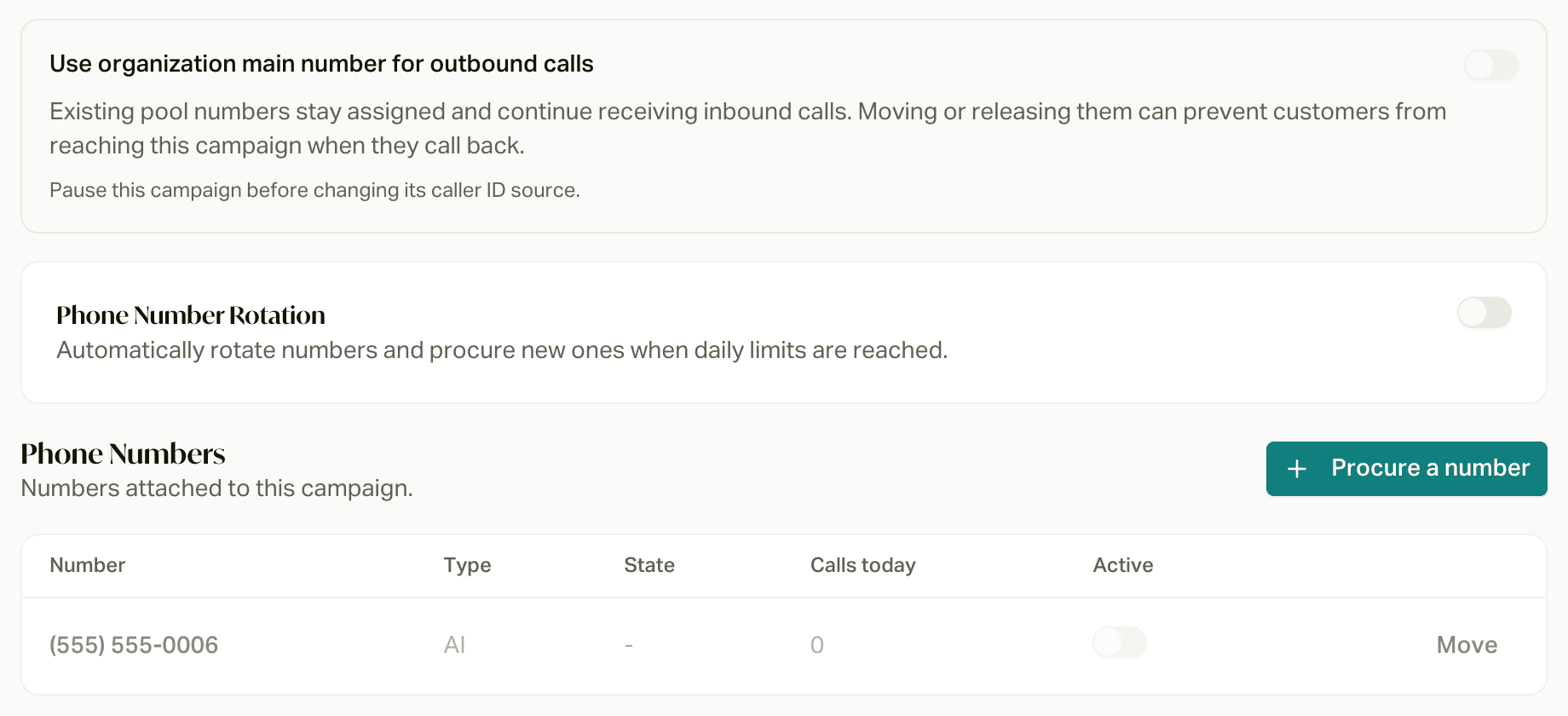
Turn off "Use organization main number for outbound calls"
You'll see Caller ID source updated. You can only change this while the campaign isn't active.
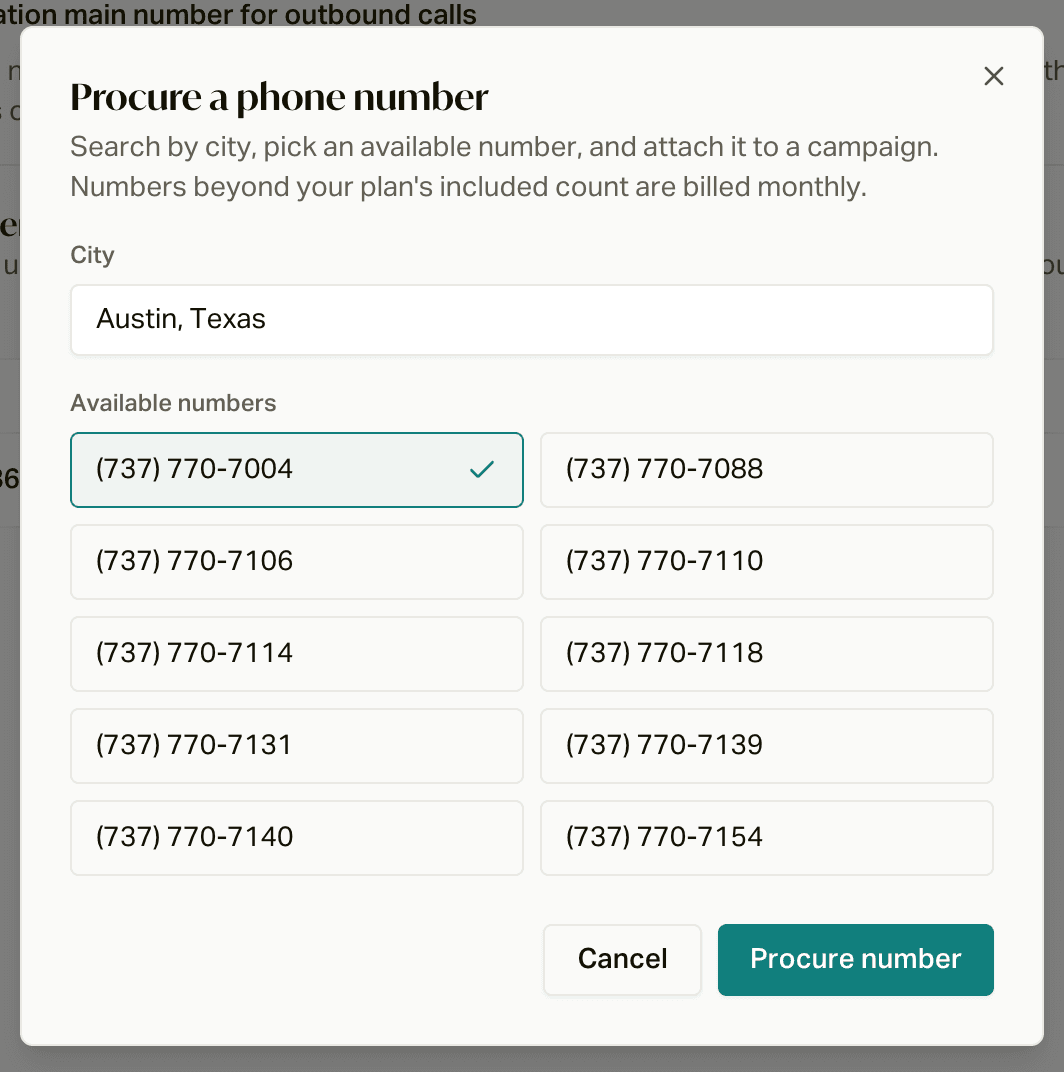
Procure a number
Click Procure a number, start typing a city, pick one of the available numbers, and click Procure number. It's attached to this campaign right away. Add as many as you want.
(Optional) Turn on rotation
For high-volume campaigns, turn on Phone Number Rotation (more on this below) so careCycle spreads calls across numbers and buys more when it needs to.
Already running?
To switch a campaign that's already active, you'll need to pause it, and careCycle won't let you switch while people are still queued up or on a call in it. If you've got a live campaign you want to move off your main number, reach out to your careCycle representative and we'll help you switch it over cleanly.
Phone number rotation
When a campaign uses its own numbers, you can turn on Phone Number Rotation on its Phone Numbers tab. With rotation on:
- Daily dial limit: each number makes up to this many calls a day (default 333). careCycle always uses the least-used number that's under the limit. The day resets at midnight in your agency's time zone.
- New numbers get bought automatically when all your numbers hit their limit, up to your Maximum pool size (leave it blank for no limit).
- Procurement states: pick the states new numbers should come from. Leave it empty and careCycle picks from anywhere.
Click Save rotation settings. With rotation off, there's no per-number limit and nothing is bought automatically. See Managing Your Phone Numbers for more.
Other calls and texts
| What | Comes from |
|---|---|
| Manual calls from your team | Your main number |
| AI appointment callbacks | Your main number |
| Texts from your campaigns and the Inbox | Your registered texting number (your main number for most agencies) |
| Campaign calls | Your main number, or the campaign's own numbers (your choice per campaign) |
| Third parties you add to a call | They see the member's number |
What it costs
Your plan includes a set number of phone numbers (1 on Independent, 5 on Agency, 10 on Agency Plus). Every number your agency owns counts toward that, including your main number. Beyond that, each number is $1 a month. Numbers you switch off still count, since you still own them.
Automated Appointment Handling
What happens after the AI books an appointment, from the confirmation text and reminders to the call at appointment time and no-shows.
Managing Your Phone Numbers
The numbers your agency owns, how to procure, move, and switch them off, and how rotation keeps high-volume campaigns healthy.