# Source Tracking (/docs/guides/sources/source-tracking)
A source is the attribution key careCycle attaches to every lead and call. Tag
everything coming into your agency with the right source, and your reporting
answers the question that actually matters: which channels produce members,
and which just produce phone bills.
Create and Manage Sources [#create-and-manage-sources]
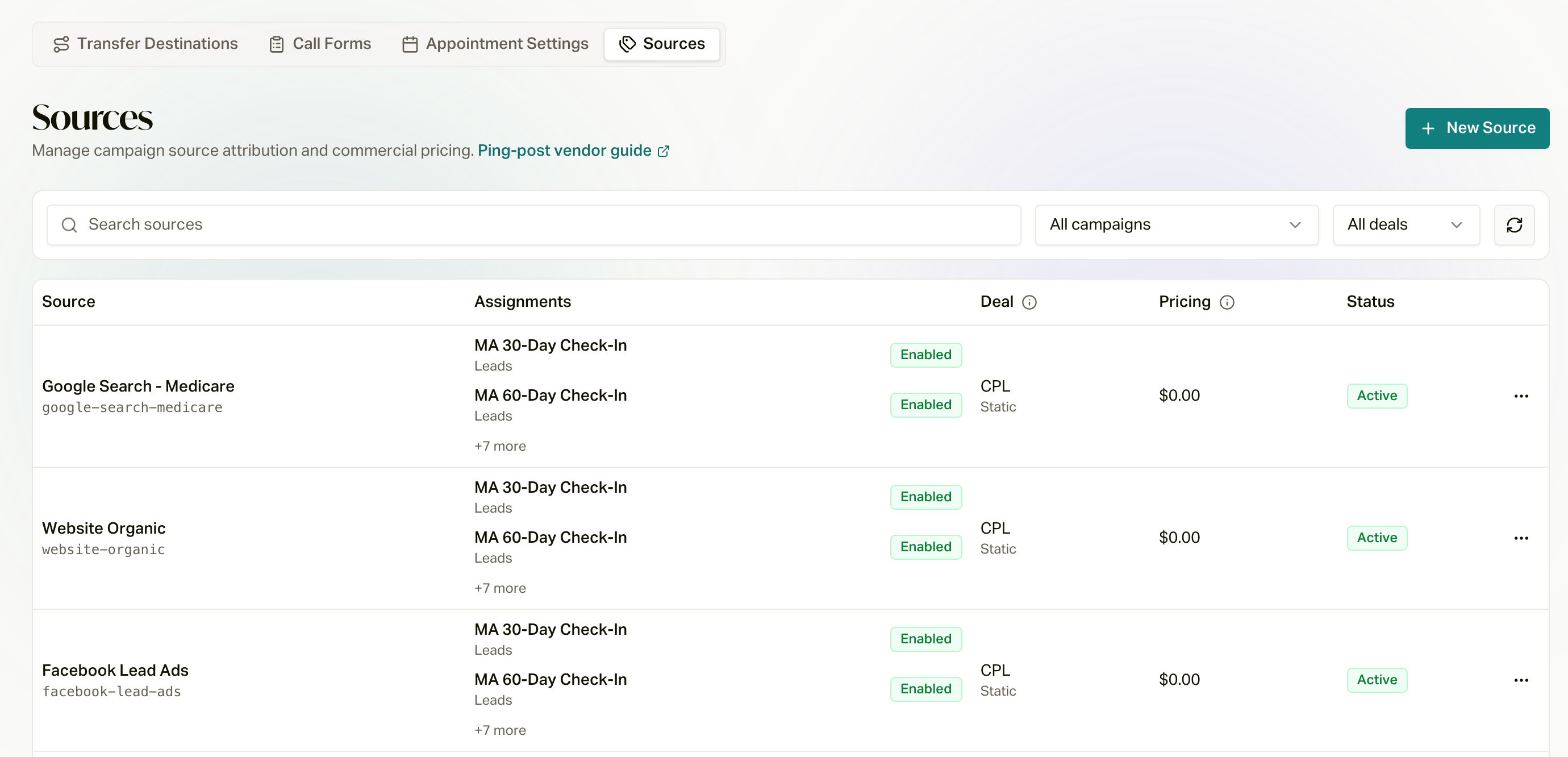
Sources live in **Configure** in the sidebar, under the **Sources** tab.
Create one source per distinct channel or vendor: each lead vendor, each call
vendor, your website, each mail drop. The more precisely you split them, the
more useful your performance comparisons become.
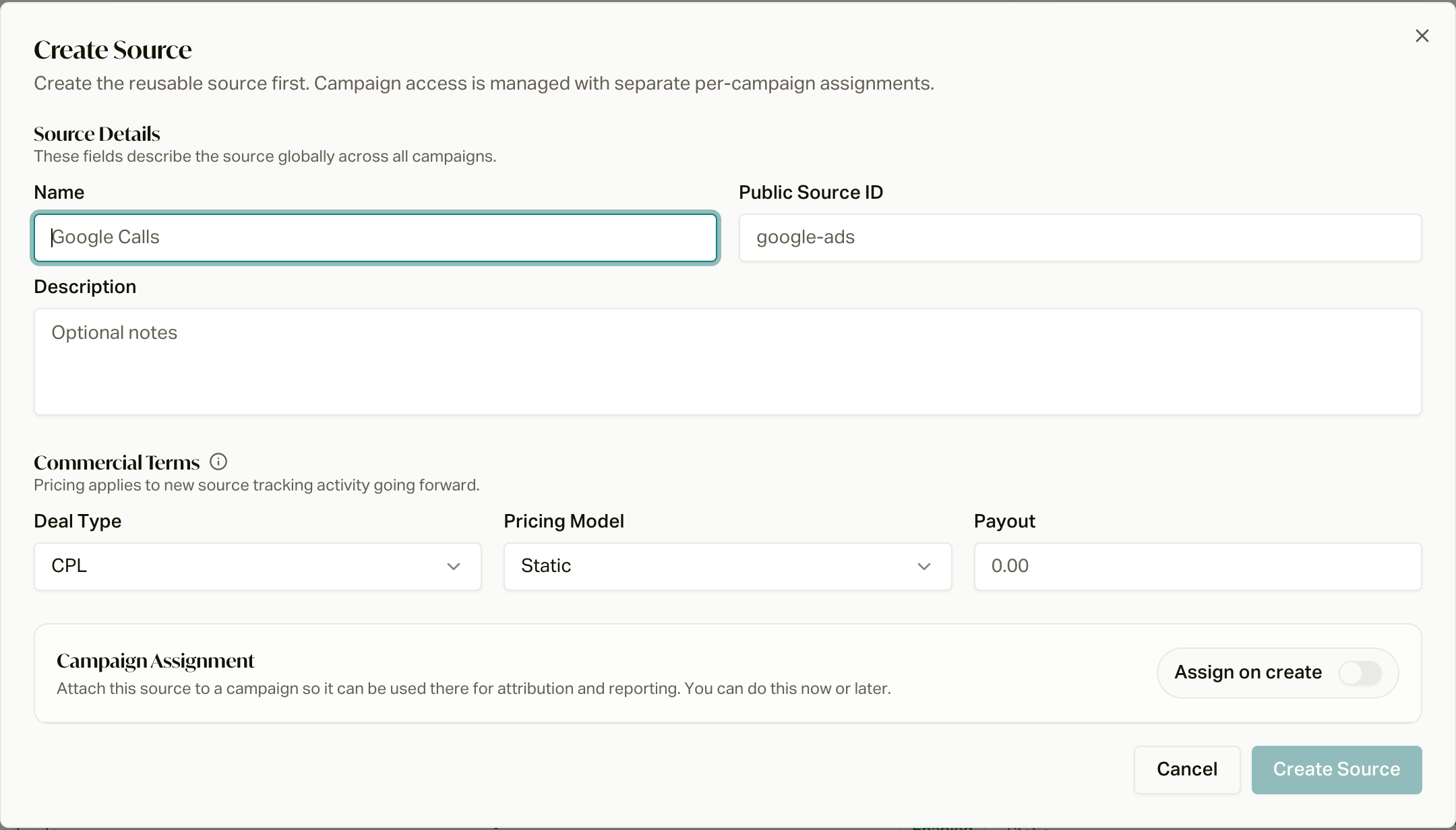
Each source carries:
* **Name and Source ID**: the Source ID is the public identifier vendors send
as `source_id` on pings or `sourceId` when uploading lead records.
* **Deal type**: **CPL** (cost per lead or call) or **CPA** (cost per
acquisition after conversion).
* **Pricing model**: static (fixed lead cost), dynamic (per-lead cost),
duration (call payout after a duration threshold), or flat and percentage
CPA payout models, with the payout, commission per sale, lead cost, and
duration threshold to match. Pricing applies to new source activity going
forward, and it is what powers the spend and CPA columns in reporting.
* **Campaign assignments**: each assignment ties the source to a campaign with
an explicit acquisition type: lead records or live inbound calls. Live calls
use an existing campaign-owned **tracking number** for attribution. Purchase
any additional numbers in the campaign's Calling numbers settings before
attaching them. Assignment does not purchase numbers or change call handling.
In campaign configuration, Voice AI and outbound agent queues offer lead-record
sources; inbound agent queues offer live-call sources. Each supports CPL or CPA
terms. The general Sources editor and API also support explicit lead and call
assignments independently of campaign direction.
Public Source ID is optional when creating a source. Leave it blank to generate
a unique identifier automatically, or supply the identifier your integration uses.
Shared source pricing must support every attached acquisition type. Disabling an
assignment keeps it attached; detaching removes it from active configuration
while preserving its historical attribution. Connecting a lead-record source in
Voice AI or outbound agent queue campaign configuration creates a source-specific
**Lead Created** enrollment automation. New leads attributed to that source enter
the campaign through the existing automation engine. Existing leads are not
enrolled retroactively. Each source has one automatic lead destination. Selecting
a different destination asks you to move future lead submissions; existing
customers remain in their current campaigns. General attribution assignments do
not silently create enrollment rules. Disabling or detaching the source assignment disables its
generated automation; re-enabling or reattaching reuses it. Live-call assignments
do not create lead enrollment automations.
Connecting a call source [#connecting-a-call-source]
Inbound agent queue setup requires a dedicated tracking number. Choose an existing
queue-owned number, or search for a new one and confirm purchase on Save. The
number is purchased, registered, assigned to the queue, and linked to the source.
The source is not enabled until assignment completes. Numbers beyond the plan's
included count are billed monthly. If purchase outcome is uncertain, setup needs
review and will not buy another number automatically. Purchased numbers remain
owned by the organization if later assignment fails.
Stopping source intake disables its assignment. It does not release or reroute
the number: the number remains connected to the queue, while new calls no longer
use that source assignment for tracking. Existing work and history are preserved.
Sources created without a campaign [#sources-created-without-a-campaign]
Creating an unattached source establishes its public identifier and commercial
terms. It does not purchase a phone number or start automatic lead enrollment.
The confirmation shows **Not connected** and links to campaign setup. Lead uploads
can carry its identifier for attribution; connect it in campaign configuration to
start enrollment or configure a call tracking number.
 The Source Performance View [#the-source-performance-view]
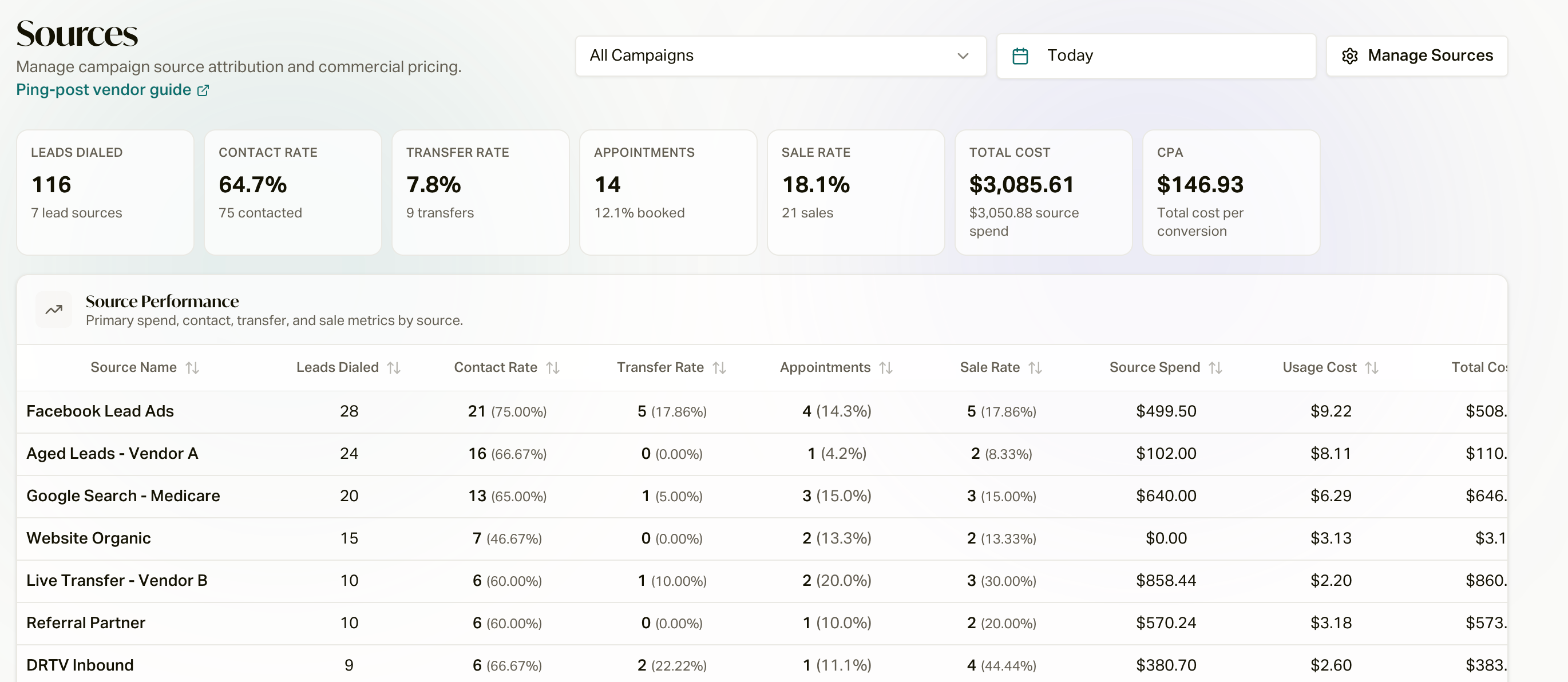
Source performance is available for campaigns with source activity (also available
across campaigns from the Wallboard's Sources tab). Pick a date range (Last 24
Hours, Today, Yesterday, Last 7 Days, Last 30 Days, or a custom window) and
compare vendors side by side inside the same campaign, where the script,
hours, and routing are identical, so differences in results reflect the source
itself.
What Is Tracked Per Source [#what-is-tracked-per-source]
| Metric | What it measures |
| ---------------------------------- | -------------------------------------------------------------------------------------------------------------- |
| **Leads Dialed** / **Total Calls** | Lead and call volume. Switch between Lead metrics and Call metrics for any campaign or the aggregate view. |
| **Contact Rate** | How often a dial reached the actual customer |
| **Transfer Rate** | How often a conversation was handed to a live agent |
| **Appointments** | Appointments booked, with booking rate |
| **Sales** / **Sale Rate** | Conversions: a policy created or a conversion recorded, tied back to the source |
| **Billable Calls** | Inbound calls that met the billing trigger (for example a duration threshold), with billable percentage |
| **External Pending** | External transfers whose outcome is not yet confirmed, so you can separate "sold" from "still waiting to hear" |
| **Source Spend** | What you paid the vendor, computed from the source's pricing model against billable activity |
| **Usage Cost** | Your careCycle usage cost for the calls attributed to that source |
| **Total Cost** and **CPA** | Spend plus usage, and total cost per conversion, the number that settles vendor debates |
Sources with ping traffic also get a **Pings** column tracking the full
funnel: volume, accept rate, dialed, billable, and converted. See
[Ping-Post](/docs/guides/sources/ping-post) for the ping funnel in depth.
Four Ways to Slice It [#four-ways-to-slice-it]
The performance view breaks the same data down four ways:
1. **Source Performance**: the primary spend, contact, transfer, and sale
metrics by source, with a weighted-average totals row.
2. **Agent Performance**: the same results grouped by assigned agent, with
sales-share and transfer-share charts, so you can tell a source problem
from a coaching problem.
3. **Disposition Mix**: the outcome distribution by source. A vendor whose
calls disproportionately end in Wrong Number or Do Not Call shows up here
first.
4. **State Performance**: the geographic distribution of source activity,
with contact, transfer, appointment, and sale breakdowns by state.
The Source Performance View [#the-source-performance-view]
Source performance is available for campaigns with source activity (also available
across campaigns from the Wallboard's Sources tab). Pick a date range (Last 24
Hours, Today, Yesterday, Last 7 Days, Last 30 Days, or a custom window) and
compare vendors side by side inside the same campaign, where the script,
hours, and routing are identical, so differences in results reflect the source
itself.
What Is Tracked Per Source [#what-is-tracked-per-source]
| Metric | What it measures |
| ---------------------------------- | -------------------------------------------------------------------------------------------------------------- |
| **Leads Dialed** / **Total Calls** | Lead and call volume. Switch between Lead metrics and Call metrics for any campaign or the aggregate view. |
| **Contact Rate** | How often a dial reached the actual customer |
| **Transfer Rate** | How often a conversation was handed to a live agent |
| **Appointments** | Appointments booked, with booking rate |
| **Sales** / **Sale Rate** | Conversions: a policy created or a conversion recorded, tied back to the source |
| **Billable Calls** | Inbound calls that met the billing trigger (for example a duration threshold), with billable percentage |
| **External Pending** | External transfers whose outcome is not yet confirmed, so you can separate "sold" from "still waiting to hear" |
| **Source Spend** | What you paid the vendor, computed from the source's pricing model against billable activity |
| **Usage Cost** | Your careCycle usage cost for the calls attributed to that source |
| **Total Cost** and **CPA** | Spend plus usage, and total cost per conversion, the number that settles vendor debates |
Sources with ping traffic also get a **Pings** column tracking the full
funnel: volume, accept rate, dialed, billable, and converted. See
[Ping-Post](/docs/guides/sources/ping-post) for the ping funnel in depth.
Four Ways to Slice It [#four-ways-to-slice-it]
The performance view breaks the same data down four ways:
1. **Source Performance**: the primary spend, contact, transfer, and sale
metrics by source, with a weighted-average totals row.
2. **Agent Performance**: the same results grouped by assigned agent, with
sales-share and transfer-share charts, so you can tell a source problem
from a coaching problem.
3. **Disposition Mix**: the outcome distribution by source. A vendor whose
calls disproportionately end in Wrong Number or Do Not Call shows up here
first.
4. **State Performance**: the geographic distribution of source activity,
with contact, transfer, appointment, and sale breakdowns by state.
 How Attribution Works Under the Hood [#how-attribution-works-under-the-hood]
careCycle keeps a per-source event ledger. Every meaningful moment (a lead
ingested, a call started, a transfer connected, a disposition recorded, an
appointment scheduled, a policy created) is recorded against the source, the
campaign, the customer, and the specific call. Sales are counted when a policy
or conversion is recorded for a customer attributed to the source, which is
what makes CPA trustworthy: it is built from outcomes recorded in the
platform.
Control Which Agents Take Which Sources [#control-which-agents-take-which-sources]
Live operations sometimes need a source turned off for a specific agent: a
vendor sending junk, or an agent who should not take overflow traffic.
Per-agent source restrictions live in the campaign's routing settings. Agents
can always see which campaigns can ring them right now (live, paused, or off
air) from the call-sources indicator in the top bar.
Sources Everywhere Else [#sources-everywhere-else]
Because source is a first-class field on calls and customers, it shows up
across the platform:
* **Calls**: the calls list has a Source column and a source filter, and CSV
exports respect it.
* **Customers**: filter customers by source, and the dashboard can chart
customers grouped by their current source.
* **Dashboards**: the Acquisition view includes Leads by Source and
Contact Rate by Source charts.
* **Automations** can filter on source, so a specific vendor's leads can
enroll into their own campaign or be excluded from one.
Vendor keys, pinged transfers, and ping funnel metrics.
The campaigns your sources feed.
How campaigns, automations, and attribution fit together.
How Attribution Works Under the Hood [#how-attribution-works-under-the-hood]
careCycle keeps a per-source event ledger. Every meaningful moment (a lead
ingested, a call started, a transfer connected, a disposition recorded, an
appointment scheduled, a policy created) is recorded against the source, the
campaign, the customer, and the specific call. Sales are counted when a policy
or conversion is recorded for a customer attributed to the source, which is
what makes CPA trustworthy: it is built from outcomes recorded in the
platform.
Control Which Agents Take Which Sources [#control-which-agents-take-which-sources]
Live operations sometimes need a source turned off for a specific agent: a
vendor sending junk, or an agent who should not take overflow traffic.
Per-agent source restrictions live in the campaign's routing settings. Agents
can always see which campaigns can ring them right now (live, paused, or off
air) from the call-sources indicator in the top bar.
Sources Everywhere Else [#sources-everywhere-else]
Because source is a first-class field on calls and customers, it shows up
across the platform:
* **Calls**: the calls list has a Source column and a source filter, and CSV
exports respect it.
* **Customers**: filter customers by source, and the dashboard can chart
customers grouped by their current source.
* **Dashboards**: the Acquisition view includes Leads by Source and
Contact Rate by Source charts.
* **Automations** can filter on source, so a specific vendor's leads can
enroll into their own campaign or be excluded from one.
Vendor keys, pinged transfers, and ping funnel metrics.
The campaigns your sources feed.
How campaigns, automations, and attribution fit together.