# Automation Triggers and Filters (/docs/guides/reference/automation-triggers-and-filters)
Campaign and task automations share this trigger and filter model. Campaign
actions enroll customers or remove them from campaigns. Task actions create one
or more task templates. For the
mental model see [Automations
Explained](/docs/guides/concepts/automations-explained); for worked examples
see the [recipes](/docs/guides/keep-your-members/chain-campaigns-with-automations).
Triggers [#triggers]
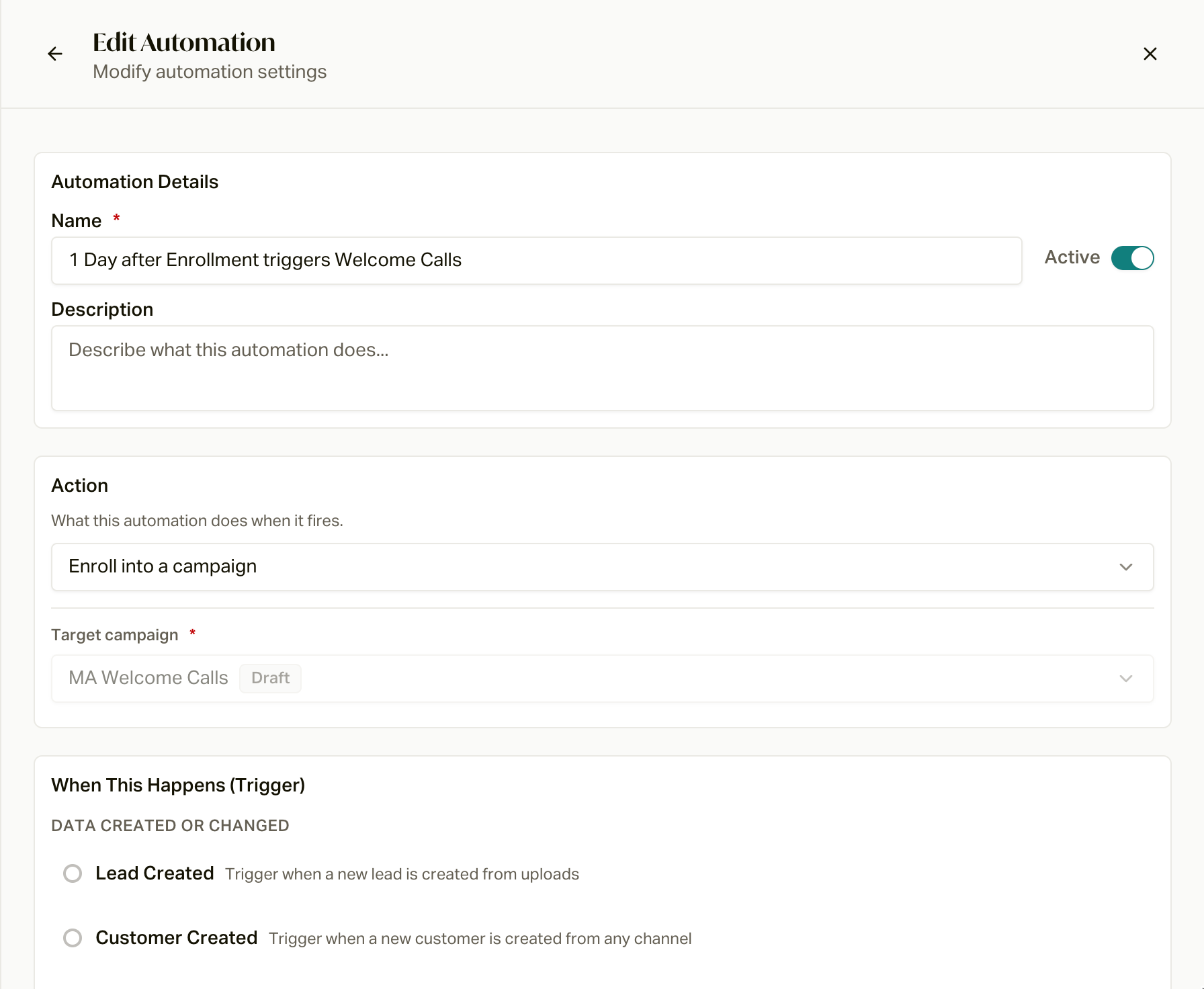 | Trigger | Group | Configuration | Exit-capable |
| ------------------------- | -------- | -------------------------------------------------------------------------------------------------------------------------------------------- | ------------ |
| **Lead Created** | Data | none (qualify with filters; the only trigger where source filters apply) | no |
| **Customer Created** | Data | none | no |
| **Policy Created** | Data | none | no |
| **Policy Status Changed** | Data | one or more From and/or To statuses; an empty side means any status | yes |
| **Date-Based** | Date | policy date field, offset 0-365 days, Before/After | no |
| **Birthday** | Date | offset 0-365 days, Before/After, optional At age (0-120) | no |
| **Day of Year** | Date | month and day (overflow dates clamp to the month's last day) | no |
| **Campaign Completed** | Campaign | source campaign (for campaign enrollment, it must differ from the target) | no |
| **Campaign Failed** | Campaign | source campaign (for campaign enrollment, it must differ from the target) | no |
| **Time In Campaign** | Campaign | days 1-3650; campaign enrollment requires a source campaign, task creation may use all active memberships, and exits apply to the exit scope | yes |
| **Task Completed** | Task | task tag, Done or Cancelled status, and optional linked-policy statuses | no |
Date-Based policy date fields: Application Approval Date, Effective Date,
Termination Date, Renewal Date, Enrollment Date, Paid Through Date, Grace
Period Start Date.
`customer_field_changed` remains supported for existing automations but is
currently hidden in the builder. Its changed to / changed from operators appear
only with it. The campaign-only `policy_changed` enum value is deprecated and
rejected on new automations.
Actions [#actions]
| Trigger | Group | Configuration | Exit-capable |
| ------------------------- | -------- | -------------------------------------------------------------------------------------------------------------------------------------------- | ------------ |
| **Lead Created** | Data | none (qualify with filters; the only trigger where source filters apply) | no |
| **Customer Created** | Data | none | no |
| **Policy Created** | Data | none | no |
| **Policy Status Changed** | Data | one or more From and/or To statuses; an empty side means any status | yes |
| **Date-Based** | Date | policy date field, offset 0-365 days, Before/After | no |
| **Birthday** | Date | offset 0-365 days, Before/After, optional At age (0-120) | no |
| **Day of Year** | Date | month and day (overflow dates clamp to the month's last day) | no |
| **Campaign Completed** | Campaign | source campaign (for campaign enrollment, it must differ from the target) | no |
| **Campaign Failed** | Campaign | source campaign (for campaign enrollment, it must differ from the target) | no |
| **Time In Campaign** | Campaign | days 1-3650; campaign enrollment requires a source campaign, task creation may use all active memberships, and exits apply to the exit scope | yes |
| **Task Completed** | Task | task tag, Done or Cancelled status, and optional linked-policy statuses | no |
Date-Based policy date fields: Application Approval Date, Effective Date,
Termination Date, Renewal Date, Enrollment Date, Paid Through Date, Grace
Period Start Date.
`customer_field_changed` remains supported for existing automations but is
currently hidden in the builder. Its changed to / changed from operators appear
only with it. The campaign-only `policy_changed` enum value is deprecated and
rejected on new automations.
Actions [#actions]
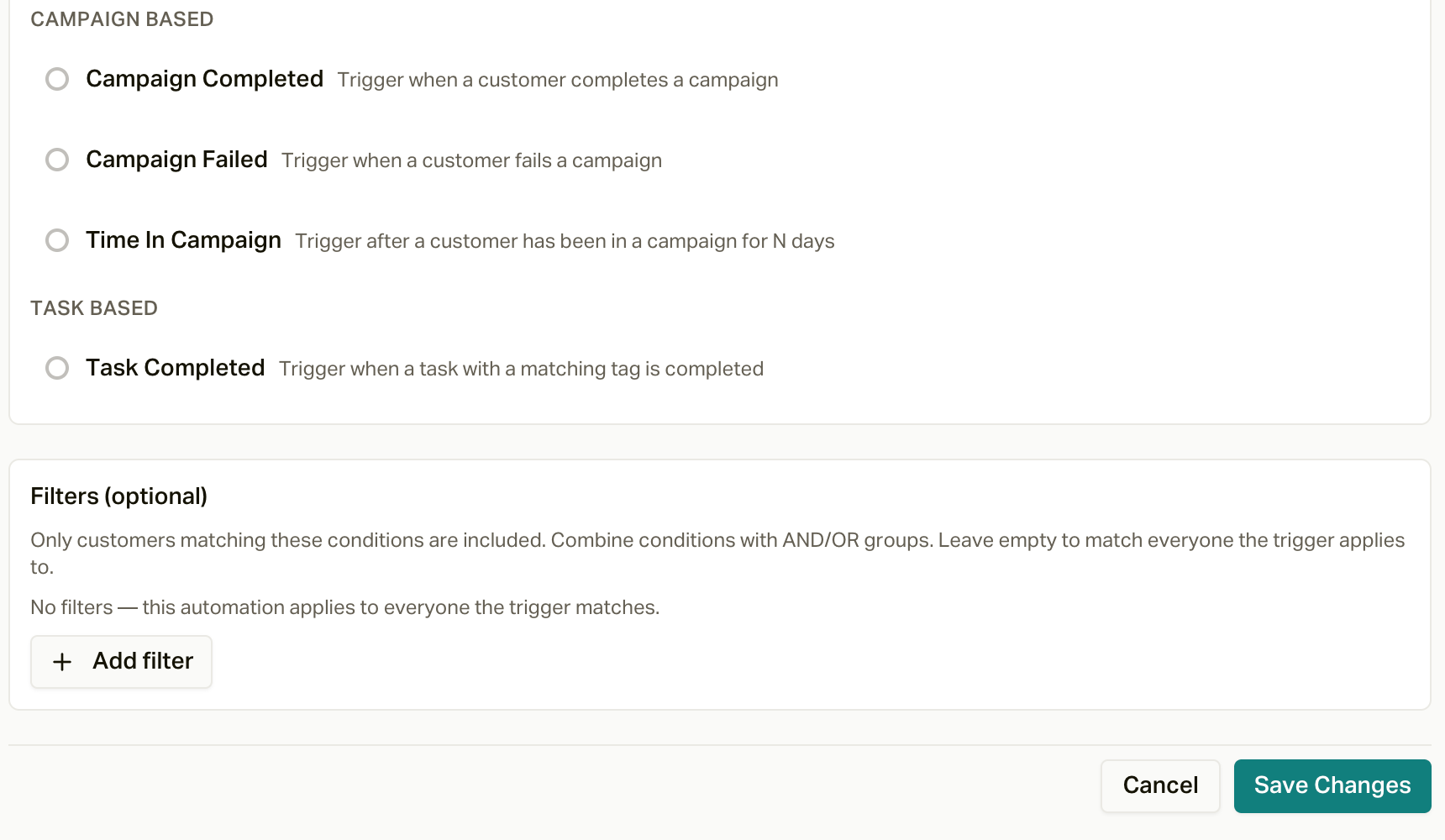 * **Enroll into a campaign**: requires a target campaign (receptionist and
ended campaigns are excluded). Campaign Completed/Failed triggers are filed
as intra automations; everything else as entry.
* **Remove from campaign(s)**: exit scope is **Any active campaign** or
**Specific campaigns**, plus a final status of **Completed** or **Failed**.
Exit automations that come from a template always use **Any active
campaign**. This action
is available for Policy Status Changed, Customer Field Changed, and Time In
Campaign.
* **Create task(s)**: each task automation contains one or more templates with
a title, description, tags, priority, and due offset. Created tasks are
assigned to the member assigned to the customer. If the customer has no
assigned member, the automation creates no tasks.
For task due offsets, `0` stores no due date. It does not mean due today. A
positive calendar-day offset adds that many 24-hour periods to the trigger
time. A positive business-day offset starts at UTC midnight and advances over
weekdays only, skipping Saturday and Sunday; holidays are not excluded.
Filters [#filters]
Filters are a single group that matches **ALL** or **ANY** of its conditions. Available
fields and their operators:
* **Enroll into a campaign**: requires a target campaign (receptionist and
ended campaigns are excluded). Campaign Completed/Failed triggers are filed
as intra automations; everything else as entry.
* **Remove from campaign(s)**: exit scope is **Any active campaign** or
**Specific campaigns**, plus a final status of **Completed** or **Failed**.
Exit automations that come from a template always use **Any active
campaign**. This action
is available for Policy Status Changed, Customer Field Changed, and Time In
Campaign.
* **Create task(s)**: each task automation contains one or more templates with
a title, description, tags, priority, and due offset. Created tasks are
assigned to the member assigned to the customer. If the customer has no
assigned member, the automation creates no tasks.
For task due offsets, `0` stores no due date. It does not mean due today. A
positive calendar-day offset adds that many 24-hour periods to the trigger
time. A positive business-day offset starts at UTC midnight and advances over
weekdays only, skipping Saturday and Sunday; holidays are not excluded.
Filters [#filters]
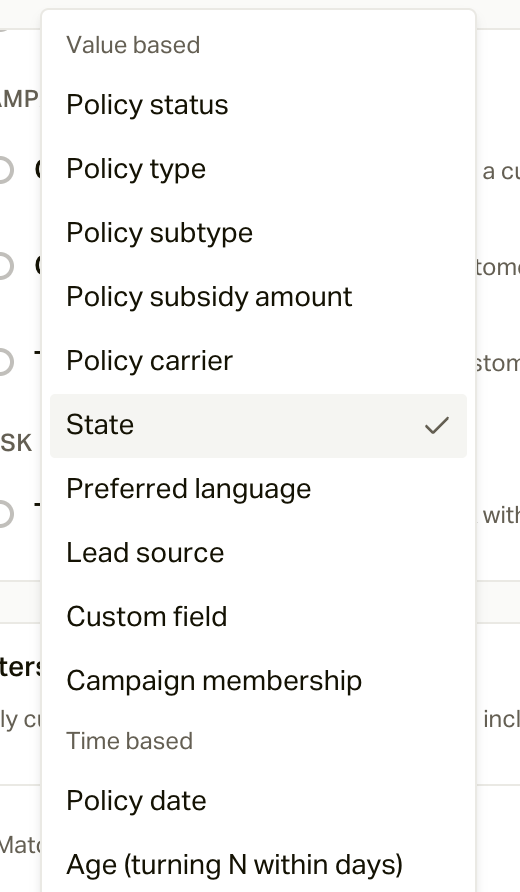
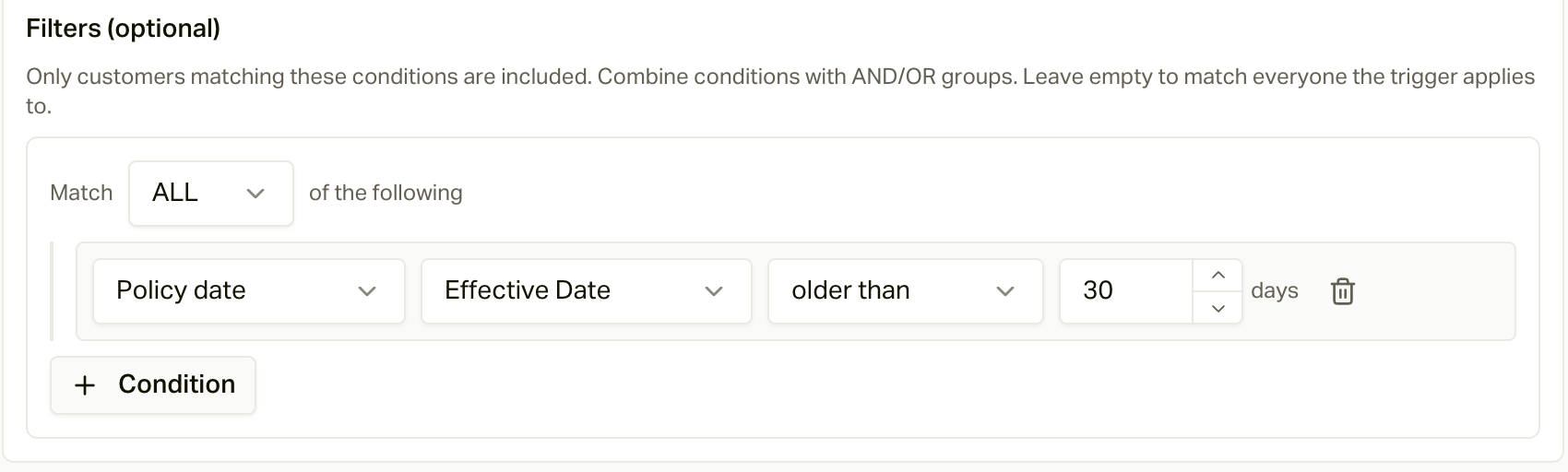
Filters are a single group that matches **ALL** or **ANY** of its conditions. Available
fields and their operators:
 | Field | Operators |
| --------------------- | ------------------------------------------------------------------------------------------------------------------------------------------- |
| Policy status | is any of, is, is not (+ changed to / changed from with the hidden field-change trigger) |
| Policy carrier | is, is not, is any of, is empty, is not empty |
| Policy type | is any of, is |
| Policy subtype | is any of, is |
| Policy subsidy amount | is, is not, greater than, at least, less than, at most, between, is empty, is not empty |
| Policy date | is, before, after, at least, at most, between, within the last N days, older than N days (pick the date field) |
| State | is any of, is |
| Preferred language | is, is any of |
| Lead source | is any of (Lead Created trigger only) |
| Custom field | is, is not, is any of, greater than, at least, less than, at most, between, is empty, is not empty (value input adapts to the field's type) |
| Age | turning N within N days (fixed form) |
| Campaign membership | active in, not active in |
Policy date filter fields include the Date-Based list above plus Cancelled
Date. Relative date windows use UTC day boundaries. "Within the last N days"
includes both the threshold date and today; "older than N days" is strictly
before the threshold. Future dates match neither operator.
Policy focus [#policy-focus]
For Policy Created, Policy Status Changed, and Date-Based triggers, policy
filters inspect only the policy that caused the event or date match. Task
Completed does the same when the completed task is linked to a policy. This
prevents an unrelated policy on the same customer from satisfying the filter.
For triggers without a focal policy, policy filters inspect all non-deleted
policies for the customer and match if any one policy satisfies the condition.
A Task Completed trigger with no linked policy follows this general
shared-filter behavior. Its optional linked-policy status setting is stricter:
when statuses are selected, a task without a linked policy does not match.
Where data triggers come from [#where-data-triggers-come-from]
| Trigger | Fires when |
| ------------------------- | ---------------------------------------------------------------------------------------------------------------------------------------------------------------------------------------------------------------------------- |
| **Lead Created** | A lead comes in through the leads API (your [lead sources](/docs/guides/sources)), on every upsert |
| **Customer Created** | A genuinely new customer comes in through the leads API. Customers created by CSV import, in the app, or by CRM sync don't fire it |
| **Policy Created** | A new policy is created from any source |
| **Policy Status Changed** | An existing policy's status changes, from CSV re-import, CRM or carrier sync, webhooks (Connecture, HealthSherpa, Spark), the API, or an edit in the app. A new policy created already in a status fires only Policy Created |
How often each trigger can fire [#how-often-each-trigger-can-fire]
| Trigger | Fires at most |
| ------------------------------------- | ------------------------------------------------------------------------------------------------ |
| Policy Created, Policy Status Changed | Once per automation and policy, ever |
| Lead Created, Customer Created | Once per automation and customer, ever |
| Date-Based | Once per automation, policy, and fire date |
| Birthday, Day of Year | Once per automation, customer, and date (so once a year) |
| Time In Campaign (enroll) | Once per automation and customer, ever |
| Campaign Completed, Campaign Failed | Once per source membership (never for expired, cancelled, or skipped), chains capped at 5 levels |
| Exit automations | Once per membership |
Separately, a customer can only have one membership per campaign. If they've
already finished the target campaign, an enroll automation does nothing; only
a manual **Restart** runs them through again.
Draft and paused targets [#draft-and-paused-targets]
Enroll automations can target Draft, Active, or Paused campaigns. Paused
campaigns hold the person until they resume. Draft campaigns don't: the
person's first step is queued immediately, and if it comes due before the
campaign is activated, the enrollment ends as **Skipped** ("Campaign was not
active") and is not revived on activation. When a campaign is completed,
archived, or cancelled, automations targeting it are switched off.
Scheduled trigger timing [#scheduled-trigger-timing]
Date-Based, Birthday, Day of Year, and Time In Campaign are evaluated by one
nightly worker at `0 8 * * *` UTC. Date arithmetic and the logical fire date use
UTC. This is midnight PST in winter and 1 AM PDT in summer; the daylight-saving
drift is intentional.
Date-Based, Birthday, and Day of Year require an exact UTC date match. Missed
dates are not caught up. Creating or enabling an automation and importing a
customer can trigger a same-day evaluation, but a date that has already passed
remains missed. February 29 birthdays and overflowing Day of Year dates clamp
to the final day of February or the configured month.
Time In Campaign uses an at-or-before threshold based on the campaign
membership's assignment time. It can therefore match on a later run after the
threshold has passed. Deduplication prevents the action from repeating after it
has fired.
These triggers and filters in action.
Define the custom fields your filters reference.
| Field | Operators |
| --------------------- | ------------------------------------------------------------------------------------------------------------------------------------------- |
| Policy status | is any of, is, is not (+ changed to / changed from with the hidden field-change trigger) |
| Policy carrier | is, is not, is any of, is empty, is not empty |
| Policy type | is any of, is |
| Policy subtype | is any of, is |
| Policy subsidy amount | is, is not, greater than, at least, less than, at most, between, is empty, is not empty |
| Policy date | is, before, after, at least, at most, between, within the last N days, older than N days (pick the date field) |
| State | is any of, is |
| Preferred language | is, is any of |
| Lead source | is any of (Lead Created trigger only) |
| Custom field | is, is not, is any of, greater than, at least, less than, at most, between, is empty, is not empty (value input adapts to the field's type) |
| Age | turning N within N days (fixed form) |
| Campaign membership | active in, not active in |
Policy date filter fields include the Date-Based list above plus Cancelled
Date. Relative date windows use UTC day boundaries. "Within the last N days"
includes both the threshold date and today; "older than N days" is strictly
before the threshold. Future dates match neither operator.
Policy focus [#policy-focus]
For Policy Created, Policy Status Changed, and Date-Based triggers, policy
filters inspect only the policy that caused the event or date match. Task
Completed does the same when the completed task is linked to a policy. This
prevents an unrelated policy on the same customer from satisfying the filter.
For triggers without a focal policy, policy filters inspect all non-deleted
policies for the customer and match if any one policy satisfies the condition.
A Task Completed trigger with no linked policy follows this general
shared-filter behavior. Its optional linked-policy status setting is stricter:
when statuses are selected, a task without a linked policy does not match.
Where data triggers come from [#where-data-triggers-come-from]
| Trigger | Fires when |
| ------------------------- | ---------------------------------------------------------------------------------------------------------------------------------------------------------------------------------------------------------------------------- |
| **Lead Created** | A lead comes in through the leads API (your [lead sources](/docs/guides/sources)), on every upsert |
| **Customer Created** | A genuinely new customer comes in through the leads API. Customers created by CSV import, in the app, or by CRM sync don't fire it |
| **Policy Created** | A new policy is created from any source |
| **Policy Status Changed** | An existing policy's status changes, from CSV re-import, CRM or carrier sync, webhooks (Connecture, HealthSherpa, Spark), the API, or an edit in the app. A new policy created already in a status fires only Policy Created |
How often each trigger can fire [#how-often-each-trigger-can-fire]
| Trigger | Fires at most |
| ------------------------------------- | ------------------------------------------------------------------------------------------------ |
| Policy Created, Policy Status Changed | Once per automation and policy, ever |
| Lead Created, Customer Created | Once per automation and customer, ever |
| Date-Based | Once per automation, policy, and fire date |
| Birthday, Day of Year | Once per automation, customer, and date (so once a year) |
| Time In Campaign (enroll) | Once per automation and customer, ever |
| Campaign Completed, Campaign Failed | Once per source membership (never for expired, cancelled, or skipped), chains capped at 5 levels |
| Exit automations | Once per membership |
Separately, a customer can only have one membership per campaign. If they've
already finished the target campaign, an enroll automation does nothing; only
a manual **Restart** runs them through again.
Draft and paused targets [#draft-and-paused-targets]
Enroll automations can target Draft, Active, or Paused campaigns. Paused
campaigns hold the person until they resume. Draft campaigns don't: the
person's first step is queued immediately, and if it comes due before the
campaign is activated, the enrollment ends as **Skipped** ("Campaign was not
active") and is not revived on activation. When a campaign is completed,
archived, or cancelled, automations targeting it are switched off.
Scheduled trigger timing [#scheduled-trigger-timing]
Date-Based, Birthday, Day of Year, and Time In Campaign are evaluated by one
nightly worker at `0 8 * * *` UTC. Date arithmetic and the logical fire date use
UTC. This is midnight PST in winter and 1 AM PDT in summer; the daylight-saving
drift is intentional.
Date-Based, Birthday, and Day of Year require an exact UTC date match. Missed
dates are not caught up. Creating or enabling an automation and importing a
customer can trigger a same-day evaluation, but a date that has already passed
remains missed. February 29 birthdays and overflowing Day of Year dates clamp
to the final day of February or the configured month.
Time In Campaign uses an at-or-before threshold based on the campaign
membership's assignment time. It can therefore match on a later run after the
threshold has passed. Deduplication prevents the action from repeating after it
has fired.
These triggers and filters in action.
Define the custom fields your filters reference.