# Configure Your Receptionist (/docs/guides/getting-set-up/configure-your-receptionist)
Your careCycle account comes equipped with Cora, an expert-trained inbound
receptionist designed to handle inbound calls from existing members or
prospective members from organic sources such as referrals and your website.
Cora can answer common questions beneficiaries ask, including:
* Benefit and coverage questions from Summary of Benefits data
* ID card questions
* Prescription costs
* Provider network questions
* Plan shopping and rate changes
* Concerns and complaints
When a member needs more support from your team, Cora can create Inquiries,
transfer calls, or book appointments. How and when she does this is controlled
through Assistant Behaviors.
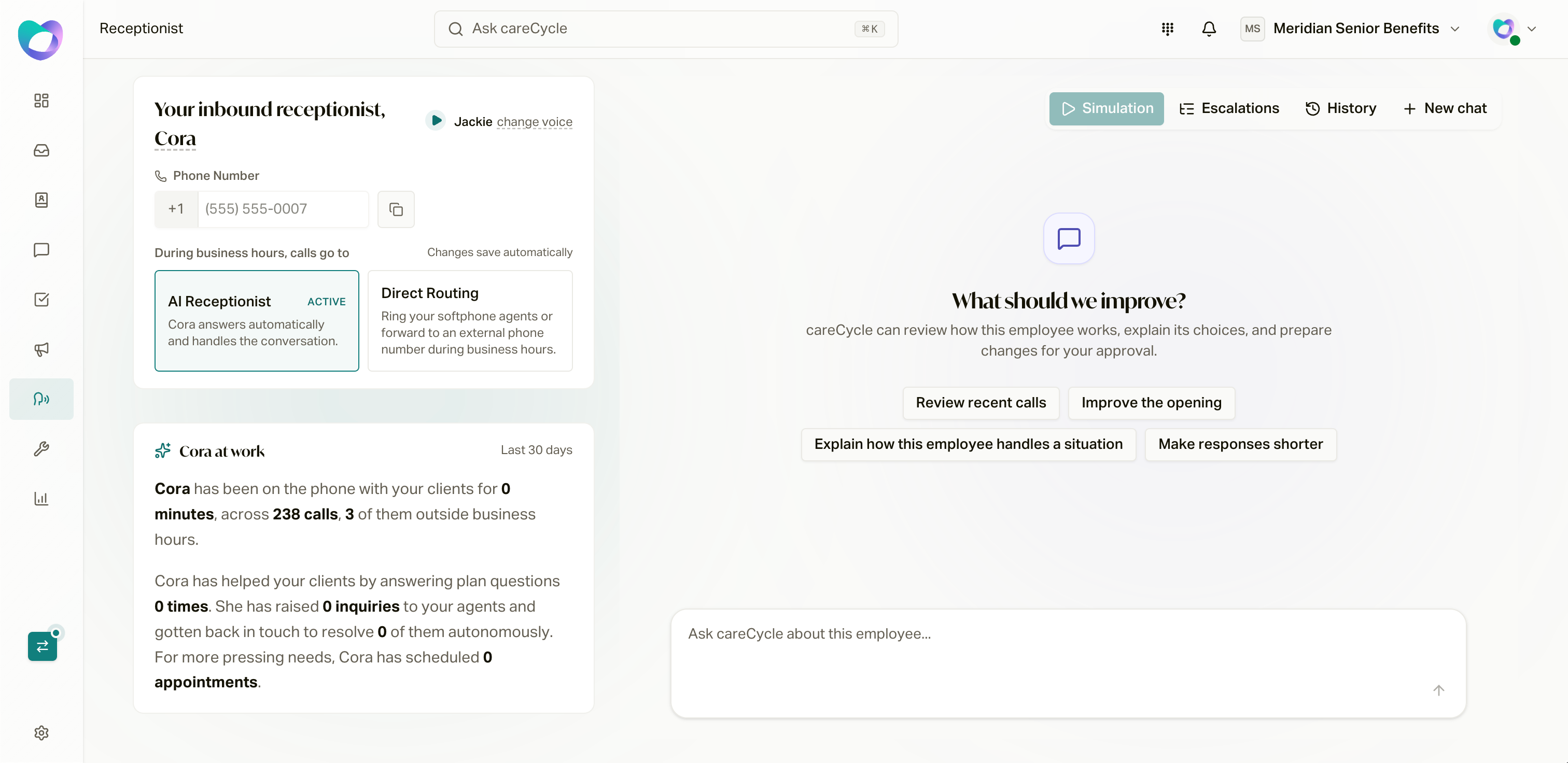
Open **Campaigns**, then the pinned **Receptionist** at the top of the list.
Its **Configuration**, **Assembly**, and **Overview** tabs bring setup,
employee review, and activity into the campaign workspace. Older Receptionist
links redirect here. For ordinary campaigns, use
[Campaign Types and Configuration](/docs/guides/campaign-toolkit/campaigns).
 Name and Voice [#name-and-voice]
Cora is yours to shape. Edit her name in the campaign header and choose/preview
her voice in **Configuration > Conversation**. Apply pending configuration with
the header **Save** action. Review employee wording and proposals in **Assembly**.
Choose How Inbound Calls Route [#choose-how-inbound-calls-route]
In **Configuration > Conversation**, choose who answers during operating hours
and outside operating hours:
* **AI Receptionist**: AI answers during the selected periods, handles what it can, and
escalates the rest according to your Assistant Behaviors. This is the right
choice for most agencies.
* **Team during operating hours**: select a routing group so eligible agents
receive incoming calls. Review the group's incoming fallback if nobody connects.
* **After hours**: choose AI or **Unavailable**. Unavailable plays an announcement
and ends the call; it does not record a caller message.
AI during both periods and team-during-hours/AI-after-hours are common setups.
Review required resources and shared scope when changing the policy. Retained
legacy forwarding or number-service settings can remain active until explicitly changed.
**Human-handled reception does not turn the Receptionist into an Agent Queue
campaign.** It remains your organization-owned main-line campaign. Direct human
incoming calls use the selected routing group's incoming fallback and applicable
callback policy. An AI-controlled transfer uses that destination's separate
Voice AI transfer fallback. With daytime agents and after-hours unavailable
handling, the unavailable message inherits from the selected routing group.
Before You Configure Behaviors [#before-you-configure-behaviors]
Behaviors hand calls and bookings to your team through two building blocks.
careCycle created a starter version of each when your Receptionist's number
was provisioned, so both already exist, but read through and adjust them
before working through the behaviors table:
1. **[Routing groups](/docs/guides/campaign-toolkit/routing)**:
where live calls route. Make sure the starter routing group has the right
agents added, and create any others you need.
2. **[Calendars](/docs/guides/campaign-toolkit/calendars)**:
how appointments get booked. Review appointment length, booking hours, and
who appointments route to.
The Transfer Call and Book Appointment options in the behaviors table stay
disabled until a routing group or calendar exists to
point at. You can also open either editor right from the table using its
**Manage** option.
Your careCycle representative will walk through both in your onboarding
session.
Escalations (Assistant Behaviors) [#escalations-assistant-behaviors]
Cora is here to help you provide world-class member service and make sure every
beneficiary feels heard. Sometimes that means getting a human involved.
Escalations (labeled **Assistant Behaviors** on the Receptionist page) control
how, when, and to whom member needs get passed.
After fielding millions of member conversations, our team has grouped member
questions into defined Scenarios. For each scenario, you decide what Cora should
do:
* Handle it herself
* Create an Inquiry for follow-up
* Transfer the call live
* Book an appointment
Recommended Starting Behaviors [#recommended-starting-behaviors]
| Scenario | Recommended behavior |
| --------------------------------- | ----------------------------------------------- |
| Plan benefit or coverage question | Cora answers from Summary of Benefits data |
| Prescription pricing | Cora answers from formulary data |
| Provider network lookup | Cora answers and offers a callback if not found |
| ID card request | Create Inquiry, assigned user follows up |
| Plan complaint or grievance | Transfer live to assigned agent |
| Plan shopping or re-enrollment | Book appointment with writing agent |
Review the actual saved starting assignments. Choose **Log Inquiry** when the
team should handle the need asynchronously, and enable transfers or booking only
for the intended scenarios and verified destinations.
Use **Configuration > Scenarios & escalations** for those assignments. Behaviors can differ between business hours and after hours,
so a scenario that transfers live during the day can create an Inquiry
overnight instead.
Watch Cora Work [#watch-cora-work]
**Overview** and the pinned campaign card show recorded activity over their
labeled windows: calls, talk time, after-hours calls, inquiries, and appointments.
Callback attempts and resolved-inquiry status are different evidence; neither
alone proves autonomous resolution. Employee simulations check conversation
behavior, while live routing and human fallback need their own verification.
Configure live call routing for Cora and campaigns.
Configure calendars and appointment handling.
Resolve follow-up needs asynchronously from the unified inbox.
Name and Voice [#name-and-voice]
Cora is yours to shape. Edit her name in the campaign header and choose/preview
her voice in **Configuration > Conversation**. Apply pending configuration with
the header **Save** action. Review employee wording and proposals in **Assembly**.
Choose How Inbound Calls Route [#choose-how-inbound-calls-route]
In **Configuration > Conversation**, choose who answers during operating hours
and outside operating hours:
* **AI Receptionist**: AI answers during the selected periods, handles what it can, and
escalates the rest according to your Assistant Behaviors. This is the right
choice for most agencies.
* **Team during operating hours**: select a routing group so eligible agents
receive incoming calls. Review the group's incoming fallback if nobody connects.
* **After hours**: choose AI or **Unavailable**. Unavailable plays an announcement
and ends the call; it does not record a caller message.
AI during both periods and team-during-hours/AI-after-hours are common setups.
Review required resources and shared scope when changing the policy. Retained
legacy forwarding or number-service settings can remain active until explicitly changed.
**Human-handled reception does not turn the Receptionist into an Agent Queue
campaign.** It remains your organization-owned main-line campaign. Direct human
incoming calls use the selected routing group's incoming fallback and applicable
callback policy. An AI-controlled transfer uses that destination's separate
Voice AI transfer fallback. With daytime agents and after-hours unavailable
handling, the unavailable message inherits from the selected routing group.
Before You Configure Behaviors [#before-you-configure-behaviors]
Behaviors hand calls and bookings to your team through two building blocks.
careCycle created a starter version of each when your Receptionist's number
was provisioned, so both already exist, but read through and adjust them
before working through the behaviors table:
1. **[Routing groups](/docs/guides/campaign-toolkit/routing)**:
where live calls route. Make sure the starter routing group has the right
agents added, and create any others you need.
2. **[Calendars](/docs/guides/campaign-toolkit/calendars)**:
how appointments get booked. Review appointment length, booking hours, and
who appointments route to.
The Transfer Call and Book Appointment options in the behaviors table stay
disabled until a routing group or calendar exists to
point at. You can also open either editor right from the table using its
**Manage** option.
Your careCycle representative will walk through both in your onboarding
session.
Escalations (Assistant Behaviors) [#escalations-assistant-behaviors]
Cora is here to help you provide world-class member service and make sure every
beneficiary feels heard. Sometimes that means getting a human involved.
Escalations (labeled **Assistant Behaviors** on the Receptionist page) control
how, when, and to whom member needs get passed.
After fielding millions of member conversations, our team has grouped member
questions into defined Scenarios. For each scenario, you decide what Cora should
do:
* Handle it herself
* Create an Inquiry for follow-up
* Transfer the call live
* Book an appointment
Recommended Starting Behaviors [#recommended-starting-behaviors]
| Scenario | Recommended behavior |
| --------------------------------- | ----------------------------------------------- |
| Plan benefit or coverage question | Cora answers from Summary of Benefits data |
| Prescription pricing | Cora answers from formulary data |
| Provider network lookup | Cora answers and offers a callback if not found |
| ID card request | Create Inquiry, assigned user follows up |
| Plan complaint or grievance | Transfer live to assigned agent |
| Plan shopping or re-enrollment | Book appointment with writing agent |
Review the actual saved starting assignments. Choose **Log Inquiry** when the
team should handle the need asynchronously, and enable transfers or booking only
for the intended scenarios and verified destinations.
Use **Configuration > Scenarios & escalations** for those assignments. Behaviors can differ between business hours and after hours,
so a scenario that transfers live during the day can create an Inquiry
overnight instead.
Watch Cora Work [#watch-cora-work]
**Overview** and the pinned campaign card show recorded activity over their
labeled windows: calls, talk time, after-hours calls, inquiries, and appointments.
Callback attempts and resolved-inquiry status are different evidence; neither
alone proves autonomous resolution. Employee simulations check conversation
behavior, while live routing and human fallback need their own verification.
Configure live call routing for Cora and campaigns.
Configure calendars and appointment handling.
Resolve follow-up needs asynchronously from the unified inbox.