# Routing (/docs/guides/campaign-toolkit/routing)
A routing group is a reusable object that tells careCycle where
to send a live call and, when applicable, what to do if the route is not
answered. Create and configure the routing group first, then assign it to a Voice
AI campaign, an Agent Queue campaign, the Receptionist, or more than one of
those contexts.
Manage routing groups under **Configure > Routing**. Use a clear
name that identifies the queue or business purpose. Softphone routing groups also
support an optional description for details such as hours, market, language, or
intended call types.
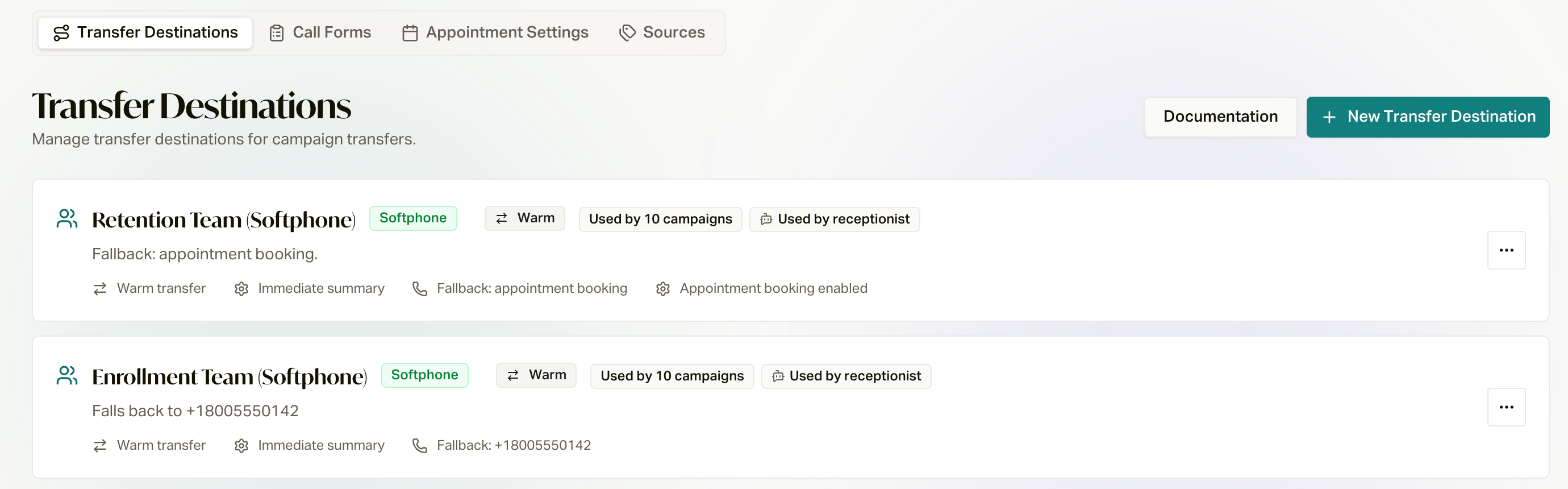 Routing groups are shared building blocks. The same routing group can be
used by multiple campaigns and the Receptionist. Review the usage shown in **Routing group details** and
any compatibility warnings before editing. A saved change applies everywhere
that routing group is assigned.
Choose a Routing Type [#choose-a-routing-type]
Select **New routing group**, enter its name, choose a type, and create
it. Creation provisions the routing group, but it is not ready for
traffic until its required details are configured and saved.
| Type | Routes to | Key configuration | Common use |
| ------------- | ----------------------------------------------- | ---------------------------------------------------------------------------------------- | --------------------------------------------------------------------------------- |
| **Direct** | One fixed phone number | Destination phone number | External desk, partner, or contact center number |
| **Dynamic** | A phone number resolved through an HTTP request | Ping URL, request method and timeout, response mapping, success conditions, and fallback | Lead buyer, partner, or CCaaS route selected at call time |
| **SIP** | A SIP endpoint | SIP URI and any required SIP headers | PBX, SBC, or contact center SIP ingress |
| **Softphone** | careCycle browser agents | Agent Routing, handoff, workspace, and fallback settings | Voice AI escalation, Inbound/Outbound Agent Queue, and human-handled Receptionist |
Direct, Dynamic, and SIP routing groups transfer outside the careCycle softphone.
They can use a cold handoff, or **Warm Transfer** to keep the caller connected
during the handoff. A Dynamic routing group can send a GET or POST request,
evaluate the response, read the transfer number from the configured field or a
fixed number, and use its selected fallback when resolution fails.
Agent Queue campaigns require a Softphone routing group because it
supplies the campaign's agents and routing policy. Other contexts can use the routing type
supported by their transfer behavior.
Softphone Agent Routing [#softphone-agent-routing]
Each Softphone routing group owns an agent roster and routing policy, configured in **Agent Routing**.
It determines which careCycle agents receive calls through the routing group.
Add organization members directly for Linear, Balanced, or Weighted routing. For
Grouped routing, create ordered agent groups, add agents to each group, and choose a
strategy within each group.
| Strategy | How agents are ordered |
| ------------ | ------------------------------------------------------------------------------------------------------------------------------------ |
| **Linear** | Rings agents one at a time in configured priority order. |
| **Balanced** | Starts with the available agent whose last routed call is oldest, distributing calls round-robin over time. |
| **Weighted** | Distributes calls according to each agent's configured weight. Higher weights receive a larger share. |
| **Grouped** | Tries groups in priority order. Each group can use Linear, Balanced, or Weighted routing before the call advances to the next group. |
All four strategies route sequentially rather than ringing the entire pool at
once. Entries disabled for routing are skipped. Configuration shows assigned
members, not who is online right now. Enable the agents and groups that should
participate when calls arrive.
Weighted routing uses relative weights, not percentages that must total 100.
Four enabled agents with a weight of 100 each have a configured 25% share each.
The displayed share estimates the chance of being tried first among enabled
agents; actual routing also applies call-time eligibility.
Priority and Eligibility [#priority-and-eligibility]
Two optional overrides can run before the base routing strategy:
* **Prioritize customer's assigned agent** tries the agent associated with the
customer record first.
* **Prioritize the agent the customer last spoke to** tries the agent who
handled the customer's most recent softphone call first.
If both are enabled, arrange them in the order they should be attempted. A
priority override does not make an unavailable or otherwise ineligible agent
eligible. If the preferred agent cannot receive the call, normal pool routing
continues.
Enable **Only route to state-licensed agents** when the customer's state must
match an agent's licenses. If no licensed agent is available, choose whether to
use the routing group's fallback immediately or remove the state filter and try all
otherwise eligible agents.
Only agents who are active, online, Available, and eligible for the call can
ring. Campaign participation and other call-specific eligibility rules still
apply.
Ring Timing and Auto Answer [#ring-timing-and-auto-answer]
| Setting | Range | Effect |
| --------------------------- | ----------------: | --------------------------------------------------------------------------- |
| **Ring Duration per Agent** | 5 to 30 seconds | How long one agent can ring before routing moves to the next eligible agent |
| **Agent Answer Window** | 10 to 120 seconds | Maximum time for the complete pool route before fallback begins |
The answer window covers the whole sequence, so it can expire before every
agent is attempted. If no eligible agent exists, careCycle proceeds to the
applicable fallback immediately.
Organization-wide availability and Auto Answer settings live under **Settings >
Organization > Softphone Settings**. Auto Answer is an agent or organization
setting, not a routing group setting. If
an Available agent has Auto Answer enabled, or the organization enforces it,
the softphone joins the routed call without waiting for the agent to select
**Answer** or **Claim**.
Handoff and Agent Workspace [#handoff-and-agent-workspace]
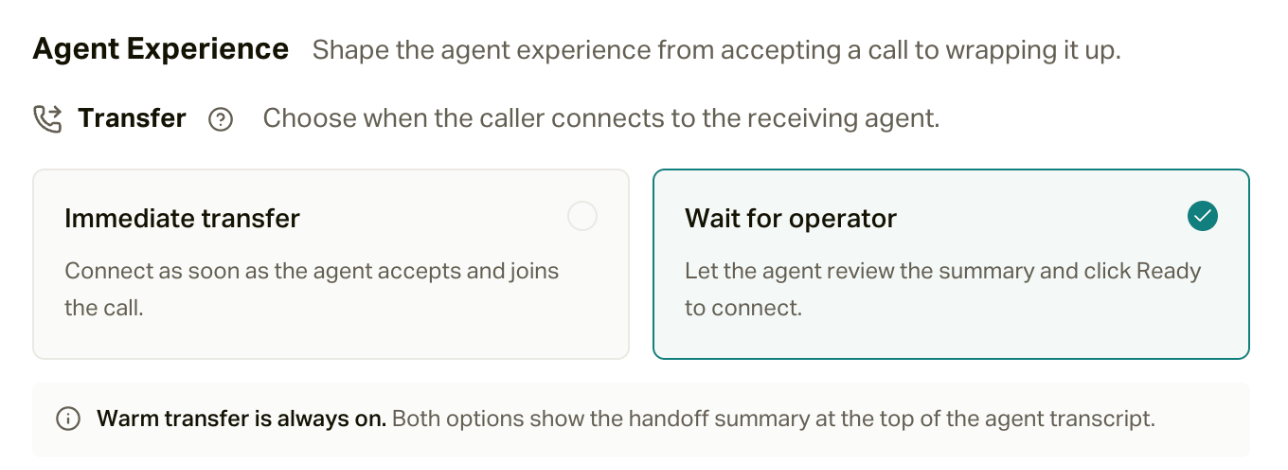
Softphone transfers are always warm: the caller remains connected while the
receiving agent gets the handoff context. Choose one connection strategy:
* **Immediate transfer** connects the caller when the agent accepts and joins.
* **Wait for operator** lets the agent review the summary and select **Ready**
before connecting the caller.
The handoff summary appears at the top of the agent transcript with either
strategy.
Routing groups are shared building blocks. The same routing group can be
used by multiple campaigns and the Receptionist. Review the usage shown in **Routing group details** and
any compatibility warnings before editing. A saved change applies everywhere
that routing group is assigned.
Choose a Routing Type [#choose-a-routing-type]
Select **New routing group**, enter its name, choose a type, and create
it. Creation provisions the routing group, but it is not ready for
traffic until its required details are configured and saved.
| Type | Routes to | Key configuration | Common use |
| ------------- | ----------------------------------------------- | ---------------------------------------------------------------------------------------- | --------------------------------------------------------------------------------- |
| **Direct** | One fixed phone number | Destination phone number | External desk, partner, or contact center number |
| **Dynamic** | A phone number resolved through an HTTP request | Ping URL, request method and timeout, response mapping, success conditions, and fallback | Lead buyer, partner, or CCaaS route selected at call time |
| **SIP** | A SIP endpoint | SIP URI and any required SIP headers | PBX, SBC, or contact center SIP ingress |
| **Softphone** | careCycle browser agents | Agent Routing, handoff, workspace, and fallback settings | Voice AI escalation, Inbound/Outbound Agent Queue, and human-handled Receptionist |
Direct, Dynamic, and SIP routing groups transfer outside the careCycle softphone.
They can use a cold handoff, or **Warm Transfer** to keep the caller connected
during the handoff. A Dynamic routing group can send a GET or POST request,
evaluate the response, read the transfer number from the configured field or a
fixed number, and use its selected fallback when resolution fails.
Agent Queue campaigns require a Softphone routing group because it
supplies the campaign's agents and routing policy. Other contexts can use the routing type
supported by their transfer behavior.
Softphone Agent Routing [#softphone-agent-routing]
Each Softphone routing group owns an agent roster and routing policy, configured in **Agent Routing**.
It determines which careCycle agents receive calls through the routing group.
Add organization members directly for Linear, Balanced, or Weighted routing. For
Grouped routing, create ordered agent groups, add agents to each group, and choose a
strategy within each group.
| Strategy | How agents are ordered |
| ------------ | ------------------------------------------------------------------------------------------------------------------------------------ |
| **Linear** | Rings agents one at a time in configured priority order. |
| **Balanced** | Starts with the available agent whose last routed call is oldest, distributing calls round-robin over time. |
| **Weighted** | Distributes calls according to each agent's configured weight. Higher weights receive a larger share. |
| **Grouped** | Tries groups in priority order. Each group can use Linear, Balanced, or Weighted routing before the call advances to the next group. |
All four strategies route sequentially rather than ringing the entire pool at
once. Entries disabled for routing are skipped. Configuration shows assigned
members, not who is online right now. Enable the agents and groups that should
participate when calls arrive.
Weighted routing uses relative weights, not percentages that must total 100.
Four enabled agents with a weight of 100 each have a configured 25% share each.
The displayed share estimates the chance of being tried first among enabled
agents; actual routing also applies call-time eligibility.
Priority and Eligibility [#priority-and-eligibility]
Two optional overrides can run before the base routing strategy:
* **Prioritize customer's assigned agent** tries the agent associated with the
customer record first.
* **Prioritize the agent the customer last spoke to** tries the agent who
handled the customer's most recent softphone call first.
If both are enabled, arrange them in the order they should be attempted. A
priority override does not make an unavailable or otherwise ineligible agent
eligible. If the preferred agent cannot receive the call, normal pool routing
continues.
Enable **Only route to state-licensed agents** when the customer's state must
match an agent's licenses. If no licensed agent is available, choose whether to
use the routing group's fallback immediately or remove the state filter and try all
otherwise eligible agents.
Only agents who are active, online, Available, and eligible for the call can
ring. Campaign participation and other call-specific eligibility rules still
apply.
Ring Timing and Auto Answer [#ring-timing-and-auto-answer]
| Setting | Range | Effect |
| --------------------------- | ----------------: | --------------------------------------------------------------------------- |
| **Ring Duration per Agent** | 5 to 30 seconds | How long one agent can ring before routing moves to the next eligible agent |
| **Agent Answer Window** | 10 to 120 seconds | Maximum time for the complete pool route before fallback begins |
The answer window covers the whole sequence, so it can expire before every
agent is attempted. If no eligible agent exists, careCycle proceeds to the
applicable fallback immediately.
Organization-wide availability and Auto Answer settings live under **Settings >
Organization > Softphone Settings**. Auto Answer is an agent or organization
setting, not a routing group setting. If
an Available agent has Auto Answer enabled, or the organization enforces it,
the softphone joins the routed call without waiting for the agent to select
**Answer** or **Claim**.
Handoff and Agent Workspace [#handoff-and-agent-workspace]
Softphone transfers are always warm: the caller remains connected while the
receiving agent gets the handoff context. Choose one connection strategy:
* **Immediate transfer** connects the caller when the agent accepts and joins.
* **Wait for operator** lets the agent review the summary and select **Ready**
before connecting the caller.
The handoff summary appears at the top of the agent transcript with either
strategy.
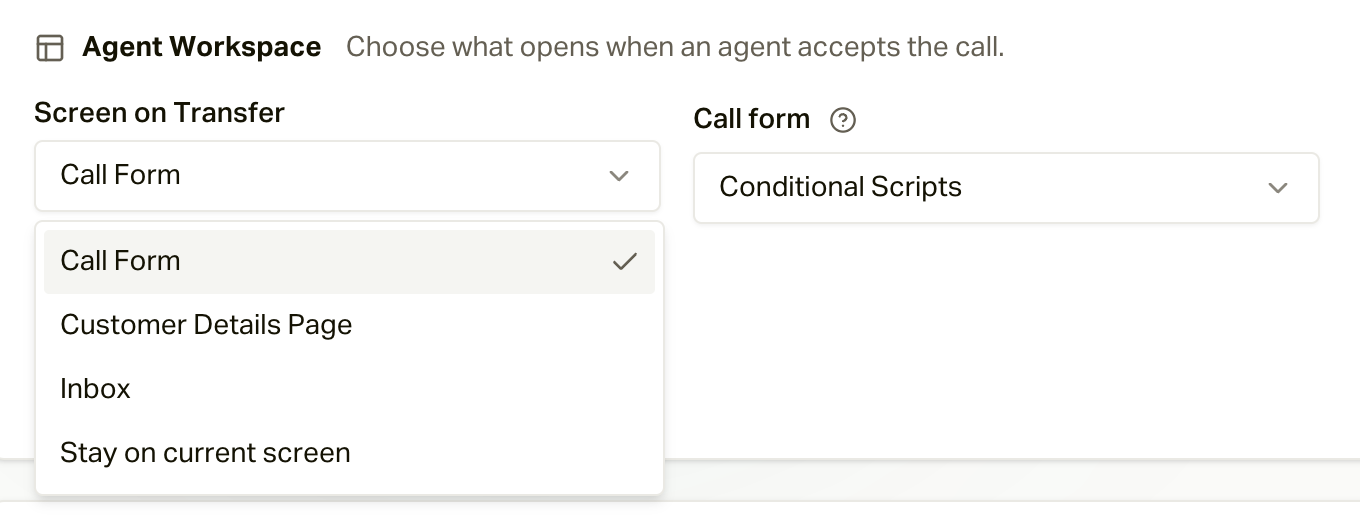
 **Screen on Transfer** controls what opens when the agent accepts: Script,
Customer Details Page, Inbox, or the current screen. If you choose **Script**,
select a routing-group script or use the default script. This
workspace choice also applies when Agent Queue outbound calls and requested
callbacks reach an agent through the routing group.
**Screen on Transfer** controls what opens when the agent accepts: Script,
Customer Details Page, Inbox, or the current screen. If you choose **Script**,
select a routing-group script or use the default script. This
workspace choice also applies when Agent Queue outbound calls and requested
callbacks reach an agent through the routing group.
 What the agent actually sees [#what-the-agent-actually-sees]
These two settings are easiest to understand from the agent's chair. With
**Wait for operator** and **Screen on Transfer: Call Form**, a transfer goes
like this:
1. **The card rings.** The agent sees who's calling, which campaign it came
from, and a **Time to claim** countdown. They click **Claim** (or
**Pass**).
2. **The summary.** Because of Wait for operator, the agent reads the AI's
**Warm Transfer Summary** first, then clicks **Start Call** when ready. With
**Immediate transfer**, this step is skipped and the caller is connected as
soon as the agent claims.
3. **The workspace opens** to whatever **Screen on Transfer** says. With Call
Form, that's the live call workspace with your form in the middle, already
filled in with the member's details, and the transcript and other panels
alongside.
If the agent has **Auto Answer** on (or your organization enforces it), steps
1 and 2 are skipped: the call is accepted for them and they land straight on
step 3. The summary is still at the top of their transcript. See [Working a
Call](/docs/guides/agents/working-a-call) for the full workspace.
Independent Fallbacks [#independent-fallbacks]
The same routing group can be the target of a Voice AI transfer and supply the agents
for an Agent Queue campaign. Configure its fallback settings
independently, according to how the call reaches the routing group:
| Call path | When these settings apply | Configuration |
| ------------------------------ | --------------------------------------------------------------------------------------------------------------------------------- | ------------------------------------------------------------------------------------- |
| **Voice AI campaign transfer** | A Voice AI campaign is already handling a live call and attempts to transfer it to this routing group, but cannot reach an agent. | **Voice AI transfer fallback** |
| **Inbound Agent Queue call** | A customer calls a queue's number and its routing group cannot connect them to an agent. | **Human-agent call fallback > Incoming calls**, plus **Inbound unavailable messages** |
| **Outbound Agent Queue call** | The dialer reaches a person, but the routing group cannot connect that answered call to an agent. | **Human-agent call fallback > Outgoing calls** |
The two Agent Queue sections follow the **actual call direction**, not just the
campaign's creation mode. An inbound call to an outbound dialer campaign uses
the inbound settings. An outbound Pulse follow-up from an inbound desk campaign
uses the outbound settings. Neither uses the Voice AI transfer fallback.
Voice AI Transfer Fallback [#voice-ai-transfer-fallback]
This section applies when a **Voice AI campaign attempts to transfer a live
call to this routing group**. It does not select who initially answers
an inbound number. If the routing group cannot supply an agent, choose one action:
* **Appointment booking** supplies the selected calendar to
the AI fallback flow so it can offer appointment options.
* **Phone number** supplies the configured phone number as the alternate
transfer target.
* **None** supplies no alternate transfer or appointment action. The calling
flow handles the unavailable result.
These settings describe the Voice AI destination-unavailable path. They are not
a promise to recover every provider, bridge, or connection failure. A failed
bridge after a transfer has started can return the caller to the assistant
instead of starting appointment booking. Appointment-origin handoffs also
suppress appointment fallback to avoid sending a booked appointment back into
booking.
Inbound Agent Queue Calls [#inbound-agent-queue-calls]
A customer calls a number belonging to an Agent Queue campaign. During
business hours, careCycle tries the agents in the routing group. If no
agent is eligible, all candidates are exhausted, or the answer window expires:
* **Play unavailable message** speaks the business-hours message and ends the call.
* **Offer a callback first** offers an eligible
caller the option to press 1. An accepted request receives a confirmation and
the call ends. If no callback is scheduled, the inbound unavailable message
plays and the call ends.
Outside business hours, ordinary unavailable handling skips agents and callback
offers and plays the **after-hours unavailable message**. Existing configured AI
answering follows the campaign's saved incoming policy instead.
Outbound Agent Queue Calls [#outbound-agent-queue-calls]
Normal Agent Queue Pulse calls are dial-first: careCycle dials the customer,
screens the answer, and then connects a live person to an agent. The
**Outgoing calls > Offer a callback** switch controls the no-agent
abandonment path after a person has answered.
* **On:** an eligible customer can press 1 to request a callback from this
routing group's agents.
* **Off, skipped, or not accepted:** the no-agent path plays the standard
system-managed no-agent message and ends the call. The call is recorded as abandoned and
the customer returns to the campaign queue.
The no-agent message is fixed by careCycle, not configured on the campaign or
destination: “We're sorry, all of our agents are currently busy. We'll call you
back shortly. Goodbye.”
The **campaign-configurable** outgoing voicemail is available in **Pulse >
Global voicemail** and individual Call steps. It applies when AMD detects an answering machine;
a Pulse call step can inherit it, override it, or choose silent hangup. It does
not replace the system-managed no-agent message spoken to a live person, or the
routing group's business-hours and after-hours inbound unavailable messages.
Before the customer has been dialed, a lack of
agent capacity waits or retries rather than presenting a callback offer.
Technical setup failures can use their own failure message.
Shared Callback Policy and Messages [#shared-callback-policy-and-messages]
Inbound and outbound callback offers have independent switches but share the
routing group's callback timing policy. Offers require an active Agent Queue
campaign, the exact enabled routing group assignment and matching agent
routing, a valid customer and phone number, no Do Not Call flag, and
enough time before business closing. An existing pending callback is acknowledged
instead of creating another request.
Callers press **1** to accept. No input or a different digit can replay the
prompt up to **five times**, with a **7-second digit wait per play**. If no
request is scheduled, the original call follows its direction-specific exit:
the inbound unavailable message or the system-managed outbound no-agent message.
The editor previews the enabled **Inbound offer**, **Outbound offer**, and
shared **Confirmation** separately. The inbound default says agents are still
helping other callers; the outbound default apologizes because the dialer
called the customer. These scripts are read-only in the editor so the spoken
instructions stay aligned with the press-1 controls.
| Setting | Allowed | Default | Purpose |
| ------------------ | ----------------: | ----------: | -------------------------------------------------------- |
| **Window** | 15 to 480 minutes | 120 minutes | Maximum time the callback can remain pending |
| **Attempts** | 1 to 5 | 2 | Maximum customer dial attempts |
| **Retry delay** | 1 to 60 minutes | 10 minutes | Delay after the customer does not answer |
| **Closing buffer** | 5 to 120 minutes | 30 minutes | Stops offers and callback attempts near business closing |
The window must be at least **Attempts x Retry delay**. Actual callback expiry
is limited by the closing buffer. Requested callbacks are accept-first:
careCycle reserves an eligible agent before dialing the customer, and answering
machine detection is not used. Normal outbound Agent Queue dialer calls remain
dial-first and use answering machine detection before agents ring.
Inbound Unavailable Messages [#inbound-unavailable-messages]
These are the messages for inbound callers who do not connect to an agent or
schedule a callback. A blank routing group field inherits the matching message
from **Settings > Organization > Softphone Settings > Unavailable messages**.
If that is also blank, careCycle uses the system default for that time window:
| Time window | System default |
| ------------------ | ------------------------------------------------------------------------------------------------ |
| **Business hours** | Thank you for calling. Our team is unable to take your call right now. Please try again shortly. |
| **After hours** | Thank you for calling. Our office is currently closed. Please call back during business hours. |
The business-hours and after-hours fields contain text that careCycle speaks
before hanging up. They are unavailable messages, not voicemail recordings or
caller mailboxes. No caller message is recorded.
The inbound and outbound callback switches control human call fallback. They do
not enable callback IVR on a Voice AI campaign transfer.
Dispositions and Wrap-Up [#dispositions-and-wrap-up]
The routing group's **Dispositions** section defines the outcomes agents can
choose after calls routed through that Softphone routing group. Add existing
library dispositions or create the labels and outcome types the team needs.
System dispositions remain available, and the organization defaults are used
when no routing-group dispositions have been added.
After a call ends, the agent remains in wrap-up until selecting a disposition
and choosing **Save & go available**. The outcome can drive reporting,
compliance, and the next step in an Agent Queue Pulse. See [Wrap-Up and
Dispositions](/docs/guides/agents/wrap-up-and-dispositions) for the agent
experience.
What Saves Where [#what-saves-where]
The routing group editor has three save behaviors:
| Action | Saves |
| ---------------------- | -------------------------------------------------------------------------------------------------------------------------------- |
| **Save routing group** | Name, Softphone description, active type and connection details, handoff, Agent Workspace, and fallback settings |
| **Save routing** | Agent or group membership, routing strategy, priorities, ring timing, answer window, and state-license behavior in Agent Routing |
| **Dispositions** | Add, remove, create, edit, and archive actions save immediately |
Selecting **Save routing group** does not save unsaved Agent Routing changes. Select
**Save routing** after changing routing, even if you also saved the routing group.
There is no final save required after a disposition action.
Recommended Setup Workflow [#recommended-setup-workflow]
Create the routing group under **Configure > Routing**.
Choose the type that matches the receiving endpoint.
Complete **Routing group details** and the connection settings. For Softphone,
add a description that makes the routing group's intended scope clear.
For Softphone, add agents or groups, select the routing strategy, configure
priority and eligibility rules, set ring timing, and select **Save routing**.
Configure handoff and Agent Workspace behavior. Configure both Voice AI and
human-agent fallback sections if the routing group may serve both contexts.
Review routing-group dispositions, then select **Save routing group**.
Confirm that the readiness checklist is complete.
Assign the routing group to the campaign, assistant behavior, or Receptionist
flow. Place a test call for every context that shares it.
Readiness and Troubleshooting [#readiness-and-troubleshooting]
* **Not ready**: complete the items shown in the routing group's Readiness panel.
A Softphone routing group needs agent routing and a selected Voice AI
fallback, even when a particular assignment will not use Voice AI fallback.
* **No agents ring**: verify the pool has agents enabled for routing, agents are online and
Available, the campaign is active where required, and licensing filters are
not excluding the whole pool.
* **Fallback starts too soon**: compare Ring Duration per Agent with the total
Agent Answer Window. The overall window can end before all agents ring.
* **The wrong screen opens**: review **Screen on Transfer** and its selected
script, then save the routing group.
* **A routing edit did not take effect**: return to Agent Routing and select
**Save routing**. The top-level routing group save is separate.
* **An unexpected campaign changed**: check the usage in **Routing group details**. Shared
routing groups apply changes to every assigned context. Create a separate
routing group when a campaign needs independent routing or fallback behavior.
Learn how the routing group drives inbound and outbound dialer calls.
Understand agent eligibility, presence, and automatic answering.
Build the routing-group workspace agents use during calls.
What the agent actually sees [#what-the-agent-actually-sees]
These two settings are easiest to understand from the agent's chair. With
**Wait for operator** and **Screen on Transfer: Call Form**, a transfer goes
like this:
1. **The card rings.** The agent sees who's calling, which campaign it came
from, and a **Time to claim** countdown. They click **Claim** (or
**Pass**).
2. **The summary.** Because of Wait for operator, the agent reads the AI's
**Warm Transfer Summary** first, then clicks **Start Call** when ready. With
**Immediate transfer**, this step is skipped and the caller is connected as
soon as the agent claims.
3. **The workspace opens** to whatever **Screen on Transfer** says. With Call
Form, that's the live call workspace with your form in the middle, already
filled in with the member's details, and the transcript and other panels
alongside.
If the agent has **Auto Answer** on (or your organization enforces it), steps
1 and 2 are skipped: the call is accepted for them and they land straight on
step 3. The summary is still at the top of their transcript. See [Working a
Call](/docs/guides/agents/working-a-call) for the full workspace.
Independent Fallbacks [#independent-fallbacks]
The same routing group can be the target of a Voice AI transfer and supply the agents
for an Agent Queue campaign. Configure its fallback settings
independently, according to how the call reaches the routing group:
| Call path | When these settings apply | Configuration |
| ------------------------------ | --------------------------------------------------------------------------------------------------------------------------------- | ------------------------------------------------------------------------------------- |
| **Voice AI campaign transfer** | A Voice AI campaign is already handling a live call and attempts to transfer it to this routing group, but cannot reach an agent. | **Voice AI transfer fallback** |
| **Inbound Agent Queue call** | A customer calls a queue's number and its routing group cannot connect them to an agent. | **Human-agent call fallback > Incoming calls**, plus **Inbound unavailable messages** |
| **Outbound Agent Queue call** | The dialer reaches a person, but the routing group cannot connect that answered call to an agent. | **Human-agent call fallback > Outgoing calls** |
The two Agent Queue sections follow the **actual call direction**, not just the
campaign's creation mode. An inbound call to an outbound dialer campaign uses
the inbound settings. An outbound Pulse follow-up from an inbound desk campaign
uses the outbound settings. Neither uses the Voice AI transfer fallback.
Voice AI Transfer Fallback [#voice-ai-transfer-fallback]
This section applies when a **Voice AI campaign attempts to transfer a live
call to this routing group**. It does not select who initially answers
an inbound number. If the routing group cannot supply an agent, choose one action:
* **Appointment booking** supplies the selected calendar to
the AI fallback flow so it can offer appointment options.
* **Phone number** supplies the configured phone number as the alternate
transfer target.
* **None** supplies no alternate transfer or appointment action. The calling
flow handles the unavailable result.
These settings describe the Voice AI destination-unavailable path. They are not
a promise to recover every provider, bridge, or connection failure. A failed
bridge after a transfer has started can return the caller to the assistant
instead of starting appointment booking. Appointment-origin handoffs also
suppress appointment fallback to avoid sending a booked appointment back into
booking.
Inbound Agent Queue Calls [#inbound-agent-queue-calls]
A customer calls a number belonging to an Agent Queue campaign. During
business hours, careCycle tries the agents in the routing group. If no
agent is eligible, all candidates are exhausted, or the answer window expires:
* **Play unavailable message** speaks the business-hours message and ends the call.
* **Offer a callback first** offers an eligible
caller the option to press 1. An accepted request receives a confirmation and
the call ends. If no callback is scheduled, the inbound unavailable message
plays and the call ends.
Outside business hours, ordinary unavailable handling skips agents and callback
offers and plays the **after-hours unavailable message**. Existing configured AI
answering follows the campaign's saved incoming policy instead.
Outbound Agent Queue Calls [#outbound-agent-queue-calls]
Normal Agent Queue Pulse calls are dial-first: careCycle dials the customer,
screens the answer, and then connects a live person to an agent. The
**Outgoing calls > Offer a callback** switch controls the no-agent
abandonment path after a person has answered.
* **On:** an eligible customer can press 1 to request a callback from this
routing group's agents.
* **Off, skipped, or not accepted:** the no-agent path plays the standard
system-managed no-agent message and ends the call. The call is recorded as abandoned and
the customer returns to the campaign queue.
The no-agent message is fixed by careCycle, not configured on the campaign or
destination: “We're sorry, all of our agents are currently busy. We'll call you
back shortly. Goodbye.”
The **campaign-configurable** outgoing voicemail is available in **Pulse >
Global voicemail** and individual Call steps. It applies when AMD detects an answering machine;
a Pulse call step can inherit it, override it, or choose silent hangup. It does
not replace the system-managed no-agent message spoken to a live person, or the
routing group's business-hours and after-hours inbound unavailable messages.
Before the customer has been dialed, a lack of
agent capacity waits or retries rather than presenting a callback offer.
Technical setup failures can use their own failure message.
Shared Callback Policy and Messages [#shared-callback-policy-and-messages]
Inbound and outbound callback offers have independent switches but share the
routing group's callback timing policy. Offers require an active Agent Queue
campaign, the exact enabled routing group assignment and matching agent
routing, a valid customer and phone number, no Do Not Call flag, and
enough time before business closing. An existing pending callback is acknowledged
instead of creating another request.
Callers press **1** to accept. No input or a different digit can replay the
prompt up to **five times**, with a **7-second digit wait per play**. If no
request is scheduled, the original call follows its direction-specific exit:
the inbound unavailable message or the system-managed outbound no-agent message.
The editor previews the enabled **Inbound offer**, **Outbound offer**, and
shared **Confirmation** separately. The inbound default says agents are still
helping other callers; the outbound default apologizes because the dialer
called the customer. These scripts are read-only in the editor so the spoken
instructions stay aligned with the press-1 controls.
| Setting | Allowed | Default | Purpose |
| ------------------ | ----------------: | ----------: | -------------------------------------------------------- |
| **Window** | 15 to 480 minutes | 120 minutes | Maximum time the callback can remain pending |
| **Attempts** | 1 to 5 | 2 | Maximum customer dial attempts |
| **Retry delay** | 1 to 60 minutes | 10 minutes | Delay after the customer does not answer |
| **Closing buffer** | 5 to 120 minutes | 30 minutes | Stops offers and callback attempts near business closing |
The window must be at least **Attempts x Retry delay**. Actual callback expiry
is limited by the closing buffer. Requested callbacks are accept-first:
careCycle reserves an eligible agent before dialing the customer, and answering
machine detection is not used. Normal outbound Agent Queue dialer calls remain
dial-first and use answering machine detection before agents ring.
Inbound Unavailable Messages [#inbound-unavailable-messages]
These are the messages for inbound callers who do not connect to an agent or
schedule a callback. A blank routing group field inherits the matching message
from **Settings > Organization > Softphone Settings > Unavailable messages**.
If that is also blank, careCycle uses the system default for that time window:
| Time window | System default |
| ------------------ | ------------------------------------------------------------------------------------------------ |
| **Business hours** | Thank you for calling. Our team is unable to take your call right now. Please try again shortly. |
| **After hours** | Thank you for calling. Our office is currently closed. Please call back during business hours. |
The business-hours and after-hours fields contain text that careCycle speaks
before hanging up. They are unavailable messages, not voicemail recordings or
caller mailboxes. No caller message is recorded.
The inbound and outbound callback switches control human call fallback. They do
not enable callback IVR on a Voice AI campaign transfer.
Dispositions and Wrap-Up [#dispositions-and-wrap-up]
The routing group's **Dispositions** section defines the outcomes agents can
choose after calls routed through that Softphone routing group. Add existing
library dispositions or create the labels and outcome types the team needs.
System dispositions remain available, and the organization defaults are used
when no routing-group dispositions have been added.
After a call ends, the agent remains in wrap-up until selecting a disposition
and choosing **Save & go available**. The outcome can drive reporting,
compliance, and the next step in an Agent Queue Pulse. See [Wrap-Up and
Dispositions](/docs/guides/agents/wrap-up-and-dispositions) for the agent
experience.
What Saves Where [#what-saves-where]
The routing group editor has three save behaviors:
| Action | Saves |
| ---------------------- | -------------------------------------------------------------------------------------------------------------------------------- |
| **Save routing group** | Name, Softphone description, active type and connection details, handoff, Agent Workspace, and fallback settings |
| **Save routing** | Agent or group membership, routing strategy, priorities, ring timing, answer window, and state-license behavior in Agent Routing |
| **Dispositions** | Add, remove, create, edit, and archive actions save immediately |
Selecting **Save routing group** does not save unsaved Agent Routing changes. Select
**Save routing** after changing routing, even if you also saved the routing group.
There is no final save required after a disposition action.
Recommended Setup Workflow [#recommended-setup-workflow]
Create the routing group under **Configure > Routing**.
Choose the type that matches the receiving endpoint.
Complete **Routing group details** and the connection settings. For Softphone,
add a description that makes the routing group's intended scope clear.
For Softphone, add agents or groups, select the routing strategy, configure
priority and eligibility rules, set ring timing, and select **Save routing**.
Configure handoff and Agent Workspace behavior. Configure both Voice AI and
human-agent fallback sections if the routing group may serve both contexts.
Review routing-group dispositions, then select **Save routing group**.
Confirm that the readiness checklist is complete.
Assign the routing group to the campaign, assistant behavior, or Receptionist
flow. Place a test call for every context that shares it.
Readiness and Troubleshooting [#readiness-and-troubleshooting]
* **Not ready**: complete the items shown in the routing group's Readiness panel.
A Softphone routing group needs agent routing and a selected Voice AI
fallback, even when a particular assignment will not use Voice AI fallback.
* **No agents ring**: verify the pool has agents enabled for routing, agents are online and
Available, the campaign is active where required, and licensing filters are
not excluding the whole pool.
* **Fallback starts too soon**: compare Ring Duration per Agent with the total
Agent Answer Window. The overall window can end before all agents ring.
* **The wrong screen opens**: review **Screen on Transfer** and its selected
script, then save the routing group.
* **A routing edit did not take effect**: return to Agent Routing and select
**Save routing**. The top-level routing group save is separate.
* **An unexpected campaign changed**: check the usage in **Routing group details**. Shared
routing groups apply changes to every assigned context. Create a separate
routing group when a campaign needs independent routing or fallback behavior.
Learn how the routing group drives inbound and outbound dialer calls.
Understand agent eligibility, presence, and automatic answering.
Build the routing-group workspace agents use during calls.